AWS MGN Cutover: Rehost a Production Server Without Data Loss
Title: AWS MGN Cutover: Rehost a Production Server Without Data Loss
An AWS MGN cutover works because block-level replication runs continuously in the background while your source server stays online, so the actual outage is only the final increment plus a reboot into EC2. To do it without data loss: install the Replication Agent, let the initial sync finish, launch and validate a test instance from the same replicated data, then run cutover during a short window and finalize once you have confirmed the new instance is healthy. Everything below is the detail that decides whether that goes smoothly or turns into a rescan at 2am.
AWS Application Migration Service (MGN) is the lift-and-shift tool for rehosting physical, virtual, or cloud servers onto EC2. This article covers the cutover mechanics for a single production server or a small wave. It does not cover replatforming or database-native replication, which are different jobs.
What MGN actually does under the hood
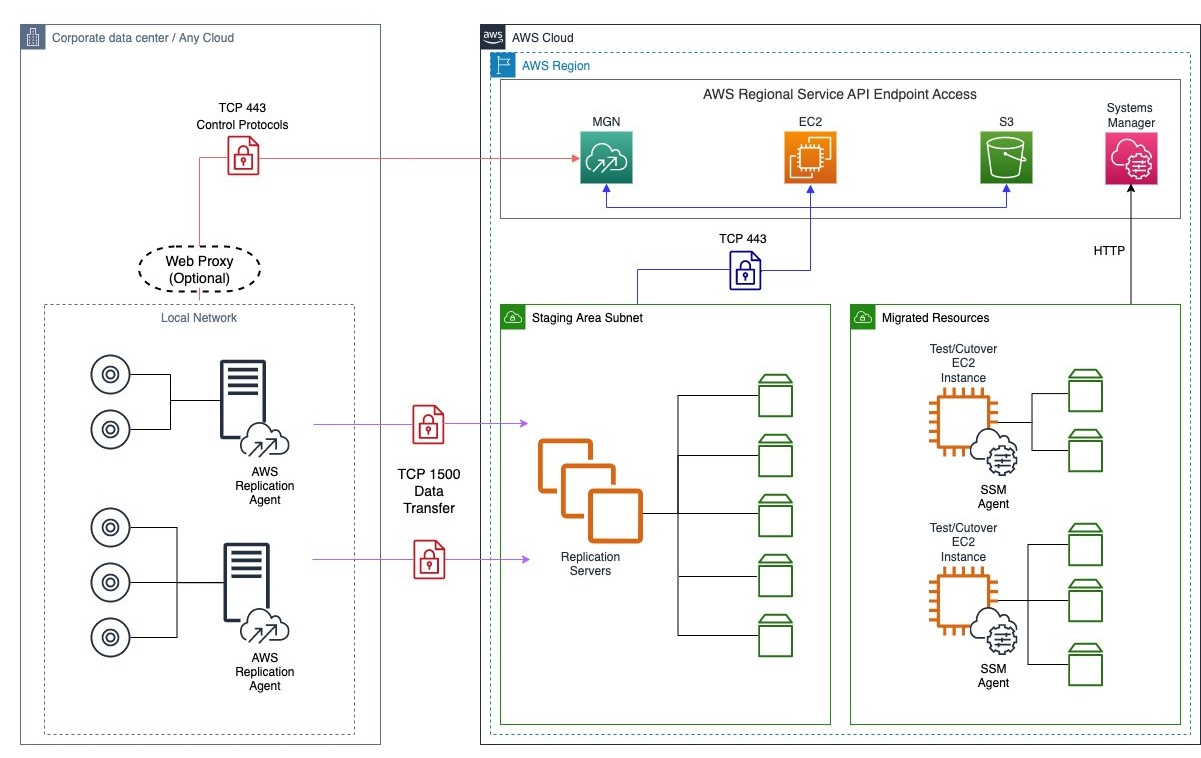
The agent replicates at the block level. <cite index="7-4">Each source server with an installed AWS Replication Agent continuously communicates with the replication servers in the staging area subnet over TCP port 1500, which is used for the transfer of replicated data from the source servers to the staging area subnet.</cite> That data is encrypted and compressed in transit. Separately, <cite index="7-2">each source server added to MGN must continuously communicate with the MGN API endpoint over TCP port 443</cite> for control-plane traffic: agent upgrades, replication status, and preparing servers for test or cutover.
On the AWS side, <cite index="0-0,0-1">replication servers are lightweight Amazon EC2 instances used to replicate data between your source servers and AWS, and they are automatically launched and terminated as needed.</cite> You do not manage them directly. You point MGN at a staging subnet, it spins the replication fleet up during initial sync, and it holds the replicated disks as EBS volumes in that subnet until you launch a test or cutover instance.
The important mental model: the replicated EBS volumes are the source of truth for both test and cutover. A test instance and a cutover instance are launched from the same continuously updated data. That is why a passing test tells you something real about the cutover.
Check these before you install a single agent
Most failed MGN migrations fail at prerequisites, not at cutover. Confirm all of this first, because fixing it after replication has started means starting over.
Operating system and disk constraints
<cite index="2-4,2-5">MGN only supports operating systems built for the x86 system architecture, and it supports replication of volumes up to a maximum size of 16 TB.</cite> If you have Arm-based instances or a single volume over 16 TB, MGN is not your tool for that server. Also confirm free space: <cite index="2-3">verify that your source server has at least 2 GB of free disk space on the root directory.</cite>
MAC address stability
This one bites people running on hypervisors that reassign NICs. <cite index="2-0,2-1,2-2">Ensure the MAC addresses of source servers do not change on reboot, because MGN calculates the unique ID of the source server from the MAC address; when a MAC address changes, MGN can no longer identify the source server and replication stops.</cite> If that happens you reinstall the agent and re-sync from scratch. Pin the MAC before you begin.
Network path and bandwidth
The agent installer needs privilege. <cite index="5-3">The AWS Replication Agent installer requires root privileges or the use of sudo, and it creates an aws-replication group and user.</cite> Open 443 outbound to the MGN endpoint and 1500 to the staging subnet from every source server.
Bandwidth is where cutover plans die quietly. <cite index="8-1">If migration runs over shared internet bandwidth using VPN, replication over the shared link can choke available bandwidth and lead to MGN going into a rescan state, from which recovery is difficult, risking the entire wave cutover plan.</cite> Before you commit to a date, <cite index="8-2">run a control test between your target AWS Region and the Region nearest your source workloads to determine a baseline replication speed.</cite> If your daily block change rate exceeds sustained throughput, you will never converge. That is the single most useful pre-flight number to have.
Replication settings that matter
You can run MGN with defaults, but three settings are worth a deliberate decision.
Staging subnet. <cite index="10-6">The best practice is to create a single dedicated, separate subnet for all of your migration waves in your AWS account</cite> rather than reusing an application subnet. It keeps the transient replication fleet isolated and makes security-group rules easy to reason about.
Encryption. Amazon EBS is the default target storage type, and staging volumes can be encrypted with a customer-managed KMS key. If you use one, the MGN service-linked role needs a KMS grant, or you will hit a "Failed to create staging disks" error. <cite index="2-6,2-7">This error may indicate the account is configured to use encrypted EBS disks but the IAM role lacks permission to encrypt using the selected KMS key; check CloudTrail for errors in the CreateVolume call and check the KMS key policy.</cite> Getting encryption and least-privilege KMS access right up front is exactly the kind of guardrail our security and compliance work exists to set before a migration, not after.
Replication server sizing for wide disks. Watch the disk count per server. <cite index="9-4">By default MGN uses a single replication server per 15 source disks, and if the total number of disks across servers sharing a replication server exceeds the EBS volume attachment limit of the instance type, the attach operation stalls.</cite> Servers with many volumes need attention here.
Test instances: the step people skip and regret
Once initial sync completes, a server reaches a ready-for-testing state. Launch a test instance from the replicated data and actually exercise it. The launch is governed by the EC2 launch template MGN maintains per source server. <cite index="4-0,4-1">Launch settings determine how a test or cutover instance is launched; you can change them after an instance has been launched, but you must launch a new instance for the new settings to take effect.</cite>
Decide now whether MGN or you own instance sizing. <cite index="3-1,3-2">With instance type right-sizing set to On, MGN launches a test or cutover instance type that best matches the OS, CPU, and RAM of the source server; set it to None to launch the instance type configured in your EC2 launch template.</cite> One caveat if you leave it On: <cite index="3-3">the instance type MGN selects overwrites the instance type defined in your EC2 launch template, and hardware changes can take up to 90 minutes to be processed.</cite> For a controlled cutover where you have already chosen target instance families, turn right-sizing off and set the type explicitly.
You can drive this from the CLI as part of a runbook:
# Launch a test instance from current replicated data
aws mgn start-test --source-server-ids s-1234567890abcdef0

# Validate, then mark ready and later launch the real cutover instance
aws mgn start-cutover --source-server-ids s-1234567890abcdef0
Use post-launch actions to automate validation instead of clicking through checks. <cite index="6-0">MGN can execute predefined post-launch actions on the launched instance, including installing the SSM agent, EC2 connectivity checks, validating volume integrity, verifying process status, validating disk space, and verifying HTTP/HTTPS responses.</cite> Wiring these into the test launch means a failed boot or a missing service shows up as a check result, not a support ticket after cutover. Post-launch checks are also where a migration hands off cleanly to ongoing reliability and SRE practice: the same signals become your first production health checks.
The cutover and finalize: what happens, and what it costs later
Cutover is deliberately reversible right up until you finalize. When you cut over, MGN launches the real instance from the latest replicated data while replication keeps running in the background. You validate the cutover instance the same way you validated the test. Only when you are satisfied do you finalize.
Finalize is the point of no return, so understand exactly what it does. <cite index="5-0,5-1,5-2">Finalize changes the source servers' lifecycle status to Cutover complete, stops data replication, causes all replicated data to be discarded, and terminates all AWS resources used for data replication.</cite> More precisely, per the API: <cite index="1-0,1-1,1-2">all AWS resources created for replication are terminated within 90 minutes, launched test or cutover instances are NOT terminated, the Replication Agent receives a command to uninstall itself within 10 minutes, and the data replication state changes to DISCONNECTED.</cite>
The trade-off is timing. Do not finalize the moment the cutover instance boots. Keep replication alive through your validation and any brief rollback window, because finalizing discards the replicated data and tears down the staging fleet. If you finalize too early and then find a problem, your fast path back is gone and you are re-syncing from the source. Finalize when you would no longer choose to roll back.
# Only after validation and your rollback window has closed
aws mgn finalize-cutover --source-server-ids s-1234567890abcdef0| Stage | What it launches | Replication after | Reversible |
|---|---|---|---|
| Test | Test instance from replicated data | Continues | Yes, terminate and retest |
| Cutover | Production instance from latest data | Continues | Yes, roll back to source |
| Finalize | Nothing | Stopped, data discarded, agent uninstalled | No |
Where MGN is the wrong tool
MGN is excellent for straightforward rehosts and data centre exits, where scale and a lease deadline dictate a wave-based approach. But it is block-level replication, and some workloads do not fit. AWS prescriptive guidance flags the exceptions directly: <cite index="9-1">database systems where the rate of change exceeds available network throughput may result in replication lag</cite>, and there are corner cases around SAN storage exposed over iSCSI and certain SQL Server Always On availability group clusters. <cite index="9-2">For each special case, consider the trade-off between your downtime requirements and the level of effort involved in using another migration tool.</cite>
For a busy transactional database, native or CDC-based replication usually gives a shorter, more predictable cutover than block replication that cannot keep up with the write rate. Planning that split, which servers go via MGN and which need a database-native path, is the core of a cloud migration engagement that ends in a boring cutover instead of a rollback.
Frequently asked questions
How long is the outage during an AWS MGN cutover?
Only the final increment plus the boot of the new EC2 instance, because replication runs continuously while the source stays online. The actual downtime is the time to flush the last block changes, stop the source, launch the cutover instance, and repoint traffic. That is typically minutes for a well-converged server, but it depends entirely on whether replication kept up with your change rate.
Does finalizing cutover delete my source server or the migrated instance?
Neither the source nor the launched instance is deleted. <cite index="1-1">Finalize does not terminate launched test or cutover instances.</cite> It stops replication, discards the replicated staging data, terminates the replication fleet, and tells the agent to uninstall. Your source server keeps running until you decommission it yourself.
Can I use MGN over a Site-to-Site VPN instead of Direct Connect?
Yes, but validate throughput first. <cite index="8-1">Replication over shared VPN bandwidth can choke the link and push MGN into a rescan state that is difficult to recover from.</cite> Run a baseline replication-speed test before committing, and if your daily block change rate is close to your available bandwidth, favour dedicated capacity or a dedicated connection.
What causes replication to stall during initial sync?
The common cause is EBS volume attachment limits. <cite index="9-4">MGN uses one replication server per 15 source disks by default, and if the combined disk count exceeds the instance type's EBS attachment limit, the attach operation stalls.</cite> KMS permission gaps on encrypted staging volumes and blocked traffic on TCP 1500 are the other frequent culprits. Check CloudTrail for CreateVolume errors and confirm the network path before assuming a bandwidth problem.
Should I leave instance type right-sizing on or off?
Turn it off when you have already decided on target instance families and want a repeatable cutover. <cite index="3-3">Right-sizing overwrites the instance type in your launch template, and hardware changes can take up to 90 minutes to process.</cite> Leave it on only for exploratory waves where you want MGN to suggest a match for source CPU and RAM.</parameter> <parameter name="sourceUrls">["https://docs.aws.amazon.com/mgn/latest/ug/Network-Requirements.html", "https://docs.aws.amazon.com/mgn/latest/ug/installation-requirements.html", "https://docs.aws.amazon.com/mgn/latest/ug/replication-server-settings.html", "https://docs.aws.amazon.com/mgn/latest/ug/right-sizing.html", "https://docs.aws.amazon.com/mgn/latest/ug/launch-cutover-gs.html", "https://docs.aws.amazon.com/mgn/latest/APIReference/API_FinalizeCutover.html", "https://docs.aws.amazon.com/mgn/latest/ug/common-replication-errors.html", "https://docs.aws.amazon.com/mgn/latest/ug/predefined-post-launch-actions.html", "https://aws.amazon.com/blogs/mt/aws-application-migration-service-best-practices/", "https://docs.aws.amazon.com/prescriptive-guidance/latest/migration-database-rehost-tools/mgn.html", "https://docs.aws.amazon.com/mgn/latest/ug/Agent-Related-FAQ.html", "https://docs.aws.amazon.com/mgn/latest/ug/ebs-storage.html", "https://docs.aws.amazon.com/mgn/latest/ug/configuring-target-gs.html"]