
Encrypt an Existing EBS Volume Without Losing Data
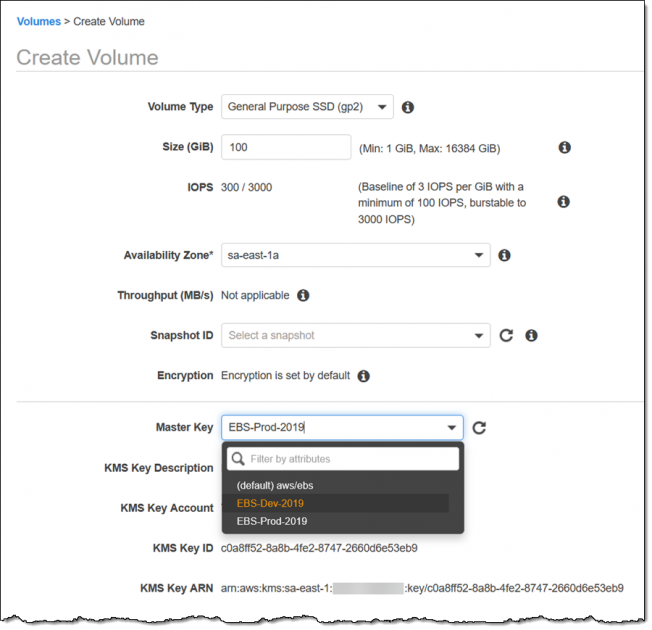
You cannot convert an unencrypted EBS volume to encrypted in place. The supported path is to snapshot the volume, create a new encrypted volume from that snapshot (or copy the snapshot to a KMS key), and swap it onto the instance. Turning on EBS encryption by default protects every new volume in a Region, but it does nothing to volumes that already exist. That gap is exactly the trap teams fall into right after a rehost, when instances arrive from tools like AWS Application Migration Service with unencrypted root and data volumes.
This article covers what to check before you touch anything, the snapshot-and-swap workflow for data and root volumes, how to enforce encryption going forward, and the trade-offs that cost you later if you get the KMS side wrong.
What to check before you change anything
Encryption changes involve KMS, and KMS mistakes are the kind you find out about weeks later when a volume will not attach. Confirm four things first.
Is encryption by default already on, and with which key
The setting is per account and per Region, so check every Region you actually use, not just the one you are looking at. From the CLI:
aws ec2 get-ebs-encryption-by-default --region eu-west-1
aws ec2 get-ebs-default-kms-key-id   --region eu-west-1
The first tells you whether new volumes are encrypted automatically; the second tells you which key does it. By default Amazon EBS uses an AWS managed key with the alias aws/ebs, created per Region on your behalf, but you can point the default at a customer managed key instead (AWS docs).
Which KMS key you actually want
EBS supports only symmetric KMS keys. You cannot use an asymmetric key to encrypt an EBS volume. Decide between the AWS managed aws/ebs key and a customer managed key. A customer managed key gives you your own key policy, rotation control, CloudTrail on Decrypt calls, and the ability to share encrypted snapshots across accounts. It also gives you a way to lock yourself out, which the next section covers.
Who else launches instances from this key
If an Auto Scaling group launches instances with volumes encrypted by a customer managed key, the Auto Scaling service-linked role needs access to that key. The key policy needs two statements: one that lets the identity use the key directly (Encrypt, Decrypt, ReEncrypt*, GenerateDataKey*, DescribeKey) and one that allows CreateGrant so the service can delegate a subset of those permissions. Miss this and scale-out events fail while your steady-state fleet looks perfectly healthy.
Instance type support
After you enable encryption by default, you can no longer launch instance types that do not support EBS encryption. In practice that means the oldest families: C1, M1, M2, and T1. Any current or previous generation type is fine, but if a legacy workload is pinned to one of those, encryption by default will block its launch.
Encrypt an existing EBS volume: the snapshot-and-swap workflow
The core fact drives everything else: you cannot directly encrypt an existing unencrypted volume or snapshot. To encrypt one, you snapshot it and create a new encrypted volume from that snapshot. And you cannot go the other way either: once a volume or snapshot is encrypted, that state is permanent, so a volume restored from an encrypted snapshot is always encrypted.
A non-root data volume
This is the low-risk case because you can detach and reattach without stopping the instance, as long as you quiesce the application first.
# 1. Snapshot the unencrypted volume
aws ec2 create-snapshot --volume-id vol-0abc... \
  --description "pre-encryption snapshot"

# 2. Create an encrypted volume from that snapshot, same AZ as the instance
aws ec2 create-volume \
  --snapshot-id snap-0def... \
  --availability-zone eu-west-1a \
  --volume-type gp3 \
  --encrypted \
  --kms-key-id alias/my-ebs-key

# 3. Stop the app, unmount, detach the old volume, attach the new one
aws ec2 detach-volume --volume-id vol-0abc...
aws ec2 attach-volume --volume-id vol-0new... \
  --instance-id i-0123... --device /dev/sdf
If encryption by default is already on, you can drop the --encrypted and --kms-key-id flags: a volume created from an unencrypted snapshot comes out encrypted with your default key automatically.
The root volume
The root volume is harder because you cannot detach it from a running instance. The restore-from-snapshot procedure requires you to stop the instance before detaching the root. So the classic path is: stop the instance, snapshot the root, create an encrypted volume from the snapshot, detach the old root, attach the new encrypted volume at the same device name, and start.
If you would rather not stop the instance for the whole operation, the replace root volume feature creates a replacement root volume while the instance stays in the running state, restoring from a snapshot or AMI. Two things to know: the replacement volume is sized as the larger of the AMI block device mapping size and the current root volume, and if the instance supports NitroTPM its NitroTPM data is reset and new keys are generated. Prepare an encrypted snapshot first, then point the replace task at it.
Re-encrypting to a different key
If a volume is already encrypted but with the wrong key (a common finding after a lift-and-shift that used the default aws/ebs key when policy calls for a customer managed key), copy the snapshot and specify the new key during the copy. Note the cost: copying a snapshot to a different KMS key produces a complete, non-incremental copy, so you pay for full snapshot storage again rather than a delta.
Enforce encryption for everything new
Fixing existing volumes is pointless if the next launch reintroduces an unencrypted disk. Turn on encryption by default per Region:
aws ec2 enable-ebs-encryption-by-default --region eu-west-1
aws ec2 modify-ebs-default-kms-key-id \
  --kms-key-id alias/my-ebs-key --region eu-west-1
Be clear about what this does and does not do. It is Region-specific, and enabling it has no effect on existing volumes or snapshots. Once on, you cannot create an unencrypted volume in that Region and you cannot disable encryption on individual volumes. It also does not reach services that manage their own storage encryption: Amazon RDS and Amazon WorkSpaces handle their own encryption and key management and are not governed by this setting.
For fleets, script the enable across every Region, or use the managed remediation. The AWSConfigRemediation-EnableEbsEncryptionByDefault runbook enables the setting in the account and Region where you run it, but note it too only affects new volumes: volumes created before you run it are not touched. Pair the runbook with an AWS Config rule so drift gets flagged and remediated rather than assumed.
The trade-offs and what they cost later
The technical steps are cheap. The decisions around them are where the bill arrives.
Downtime. Data volumes cost you a brief detach window. Root volumes cost you a stop/start unless you use the replace-root-volume task. Plan the snapshot and volume creation in advance so the actual swap window is short; snapshot creation and encrypted volume creation happen while the instance runs.
Storage during migration. Re-encrypting to a new key means full, non-incremental snapshot copies, so a large re-key project temporarily doubles snapshot storage for the volumes in flight. Sequence it and delete source snapshots once the new volumes are verified.
KMS lifecycle risk. This is the one that turns a security improvement into an outage. Amazon EC2 uses a data key, not the KMS key itself, for disk I/O while a volume is attached, so disabling or scheduling deletion of the KMS key has no immediate effect. But when the volume is detached the data key is removed from the Nitro hardware, and the next attach fails because EBS can no longer decrypt it. A customer managed key you delete, or a cross-account key whose grant you revoke, is a delayed-action data-loss event. Treat encryption keys as long-lived infrastructure: restrict kms:ScheduleKeyDeletion, and never delete a key while any snapshot or AMI still depends on it.
| Approach | Interruption | Best for |
|---|---|---|
| Snapshot then swap data volume | Detach/attach window, app quiesced | Secondary volumes on a live instance |
| Stop, snapshot, swap root volume | Instance stop/start | One-off root volume fixes |
| Replace root volume task | Instance stays running, brief reset | Stateful hosts you cannot fully stop |
| Launch fresh from encrypted AMI | Full cutover to new instance | Immutable infrastructure and Auto Scaling |
For teams running immutable infrastructure, the cleanest answer is often none of the in-place options: bake an encrypted AMI, roll the Auto Scaling group, and let the old unencrypted instances terminate. That folds the encryption fix into a deploy you were going to do anyway, and it removes the per-instance surgery entirely. If your estate is a mix of pets and cattle, expect to use two or three of these approaches, and design the KMS key policy once so every path uses the same key. If you are standardising encryption as part of a broader controls baseline, our security and compliance service covers key policy design and Config-based enforcement across accounts.
Frequently asked questions
Can I encrypt an EBS volume without downtime?
Not entirely, but you can keep the interruption small. For a non-root data volume, create the encrypted volume from a snapshot ahead of time so the only downtime is the detach and reattach after you quiesce the application. For a root volume, either accept a stop/start or use the replace root volume task, which keeps the instance in the running state while it swaps in a replacement volume built from an encrypted snapshot.
Does enabling EBS encryption by default encrypt my existing volumes?
No. Encryption by default is a Region-specific setting that only affects volumes and snapshot copies you create after enabling it. Existing volumes and snapshots are left exactly as they were, so you still have to snapshot and re-create each unencrypted volume to bring it into compliance.
Can I remove encryption from an EBS volume later?
No. Once a volume or snapshot is encrypted, that state is permanent, and any volume restored from an encrypted snapshot is always encrypted. If you need unencrypted data on a new volume, you have to copy the data at the file-system level onto a fresh unencrypted volume rather than converting the encrypted one.
What happens if I delete the KMS key used by an encrypted volume?
Nothing immediately, which is the danger. The volume keeps working while attached because EC2 uses a cached data key, but once the volume is detached the data key is dropped from the Nitro hardware and the next attach fails because EBS can no longer decrypt it. Scheduling deletion of a key that any volume, snapshot, or AMI still depends on is effectively delayed data loss, so lock down deletion permissions.
Should I use the aws/ebs key or a customer managed key?
Use a customer managed key when you need your own key policy, rotation control, CloudTrail visibility on decrypt calls, or cross-account snapshot sharing, which most compliance baselines eventually require. The AWS managed aws/ebs key is fine for getting encryption on quickly with no key administration. Either way EBS requires a symmetric key; asymmetric keys are not supported.