Enforce IMDSv2 Across an AWS Fleet Without Breaking Workloads
To enforce IMDSv2 across an AWS fleet safely, do it in three stages: first audit IMDSv1 usage with the CloudWatch MetadataNoToken metric until it reaches zero, then set HttpTokens=required on instances and as the account default, and finally block regressions with an SCP that denies ec2:RunInstances unless ec2:MetadataHttpTokens equals required. Skipping the audit is how you take down a workload that still reads credentials over IMDSv1.
This is a hardening job with a real blast radius. IMDSv2 closes the SSRF and open-proxy path to instance credentials, but the moment you require it, any agent or SDK still using IMDSv1 stops getting a response. The order of operations matters more than any single command.
What IMDSv2 changes and why the order matters
IMDSv1 is a plain request/response: anything that can reach 169.254.169.254 from the instance gets metadata, including the IAM role credentials. IMDSv2 makes that a session. <cite index="0-4,0-5">You use a PUT request to initiate a session, which returns a token that must be included in subsequent GET requests, and when token usage is set to required, requests without a valid token receive a 401 Unauthorized.</cite> That token defeats the classic SSRF-to-credential-theft chain, because a reverse proxy or a tricked application usually cannot issue the PUT.
The catch is the switch is binary per instance. <cite index="1-5">When IMDSv2 is required on an instance, an IMDSv1 request will fail.</cite> If you flip required before your software is ready, credential fetches, monitoring agents and older SDK calls break at once. So the sequence is: make IMDSv2 available everywhere, prove nothing depends on v1, then require it, then enforce it so it cannot drift back.
There is one behaviour that hides breakage during testing. <cite index="8-0">If an IMDSv2 call receives no response, some AWS SDKs retry the call and, if still unsuccessful, use IMDSv1, which can cause a delay, especially in a container environment.</cite> That fallback means an app can "work" while quietly still using v1, which is exactly why you audit with a metric rather than by eyeballing behaviour.
Check this first: audit IMDSv1 before you change anything
Do not touch HttpTokens until you can see who is still calling v1. Two CloudWatch metrics tell you, and they are designed for exactly this.
<cite index="3-1">The MetadataNoToken metric tracks the number of calls to the IMDS that are using IMDSv1, and by tracking this metric to zero you can determine if and when all of your software has been upgraded to use IMDSv2.</cite> After you disable v1, the companion metric takes over: <cite index="3-1">MetadataNoTokenRejected tracks the number of times an IMDSv1 call was attempted and rejected.</cite>
They do not overlap, which makes them easy to reason about. <cite index="3-2">For each EC2 instance these metrics are mutually exclusive: when IMDSv1 is enabled, only MetadataNoToken emits, and when IMDSv1 is disabled, only MetadataNoTokenRejected emits.</cite>
Practical audit loop:
- In each Region, filter the EC2 console or use the API to find instances where IMDSv2 is
optional. <cite index="3-4">To assess your migration scope, identify instances that are configured to allow either IMDSv1 or IMDSv2 and audit IMDSv1 calls.</cite> - Graph
MetadataNoTokenper instance in theAWS/EC2namespace. Anything above zero is still calling v1. - For instances that keep emitting, find the culprit process. The open-source IMDS Packet Analyzer runs on the host and identifies the calling process, which beats guessing.
- Fix the caller: update the SDK or CLI, or set the AWS Region explicitly so a container SDK stops probing IMDS. <cite index="3-0">The latest versions of the AWS CLI and AWS SDKs support IMDSv2, so update your instances to use the latest versions.</cite>
Old base images are the usual offender. <cite index="2-2,3-0">Amazon Linux 2023 requires IMDSv2 and disables IMDSv1 by default, and all Amazon Linux 2 and 2023 software packages support IMDSv2.</cite> If you are still baking off CentOS 7 or an ancient golden AMI, that is where your MetadataNoToken count lives.
The container hop-limit trap
This is the single most common way an IMDSv2 rollout breaks a healthy service, and it has nothing to do with credentials. <cite index="5-4">By default, the response to PUT requests has a hop limit of 1 at the IP protocol level, and you can adjust it for backward compatibility with container services running on the instance.</cite>
A container on the host is one extra network hop, so with a hop limit of 1 the token response never reaches the process inside the container, and the SDK silently falls back to v1 or times out. Set the hop limit to 2 for a normal container setup. <cite index="2-2">AWS recommends testing with a hop limit of three in container environments.</cite> If you run ECS or EKS, fix this before you require v2, or your first required instance will look like a network outage.
Note the trade-off with the SCP later: if you deny launches where the hop limit is above 2, you cannot also raise it to 3 for a container node. Pick the limit your workload needs before you write the guardrail.
Roll it out: instance, account default, then SCP
There are three enforcement layers, and they stack. Understand which one does what before you apply any.
| Layer | Command / mechanism | What it does | What it does not do |
|---|---|---|---|
| Per-instance | modify-instance-metadata-options --http-tokens required | Requires v2 on one running instance | Nothing to new launches or other instances |
| Account default + enforcement | ModifyInstanceMetadataDefaults, per Region | New launches default to v2; enforcement blocks v1 launches | Does not change existing instances |
| SCP | ec2:MetadataHttpTokens condition on RunInstances | Org-wide deny of non-compliant launches | Does not remediate instances already running |
Set it on existing instances
For a single instance, require v2 and keep the endpoint on. <cite index="1-2">Use modify-instance-metadata-options and set http-tokens to required, and when you specify a value for http-tokens you must also set http-endpoint to enabled.</cite>
aws ec2 modify-instance-metadata-options \
  --instance-id i-1234567890abcdef0 \
  --http-tokens required \
  --http-endpoint enabled \
  --http-put-response-hop-limit 2
For fleets, drive it from Systems Manager rather than a loop of CLI calls. <cite index="2-0">You can run the EnforceEC2InstanceIMDSv2 automation document in Systems Manager, which enforces IMDSv2 using the ModifyInstanceMetadataOptions API.</cite> Use Rate Control so a bad batch does not take out everything at once.
Set the account default per Region
Account defaults catch every future launch, but they are Region-scoped and do not touch what is already running. <cite index="4-1">Setting the account-level default does not reset existing instances: if you set the default to IMDSv2, existing instances set to IMDSv1 are not affected.</cite>
Then turn on enforcement so no one can launch a v1 instance. <cite index="3-3,4-4">When IMDSv2 enforcement is enabled, instances configured to launch with IMDSv1 will fail to launch, and attempts to enable IMDSv1 on existing instances that have it disabled are prevented, while existing instances that already have IMDSv1 enabled are not affected.</cite> That last clause is why the account layer is not enough on its own: it protects new launches, not the servers already up.
Because these settings are per Region, script them across every Region you use, not just your primary. Freshly migrated servers make this concrete: instances launched by our cloud migration service land as ordinary EC2 instances and inherit the account default of whatever Region they cut over into, so set the default before the cutover, not after.
Lock it with an SCP
The durable control lives in AWS Organizations. The published example denies non-compliant launches and, critically, neutralises credentials that were still fetched over v1.
{
  "Version": "2012-10-17",
  "Statement": [
    { "Effect": "Deny", "Action": "ec2:RunInstances",
      "Resource": "arn:aws:ec2:*:*:instance/*",
      "Condition": { "StringNotEquals": { "ec2:MetadataHttpTokens": "required" } } },
    { "Effect": "Deny", "Action": "ec2:RunInstances",
      "Resource": "arn:aws:ec2:*:*:instance/*",
      "Condition": { "NumericGreaterThan": { "ec2:MetadataHttpPutResponseHopLimit": "2" } } },
    { "Effect": "Deny", "Action": "*", "Resource": "*",
      "Condition": { "NumericLessThan": { "ec2:RoleDelivery": "2.0" } } }
  ]
}
The three statements do different jobs. The first two are drawn from the AWS example SCP that <cite index="0-1">restricts all users from launching EC2 instances without IMDSv2.</cite> The third is the belt-and-braces control: <cite index="3-3">by using the condition key ec2:RoleDelivery with a value of 2.0, API calls made with EC2 role credentials obtained from IMDSv1 receive an UnauthorizedOperation response.</cite> Even if a v1 instance slips through, credentials it hands out cannot call the API.
Two operational notes before you apply this org-wide. Auto Scaling is a gotcha: <cite index="9-1">if you use Auto Scaling groups and need to require IMDSv2 on all new instances, your groups must use launch templates.</cite> And if you bake AMIs, set the AMI-level flag so instances default correctly: <cite index="7-0">registering an AMI with imds_support set to v2.0 means instances launched from it have HttpTokens automatically set to required and HttpPutResponseHopLimit set to 2.</cite>
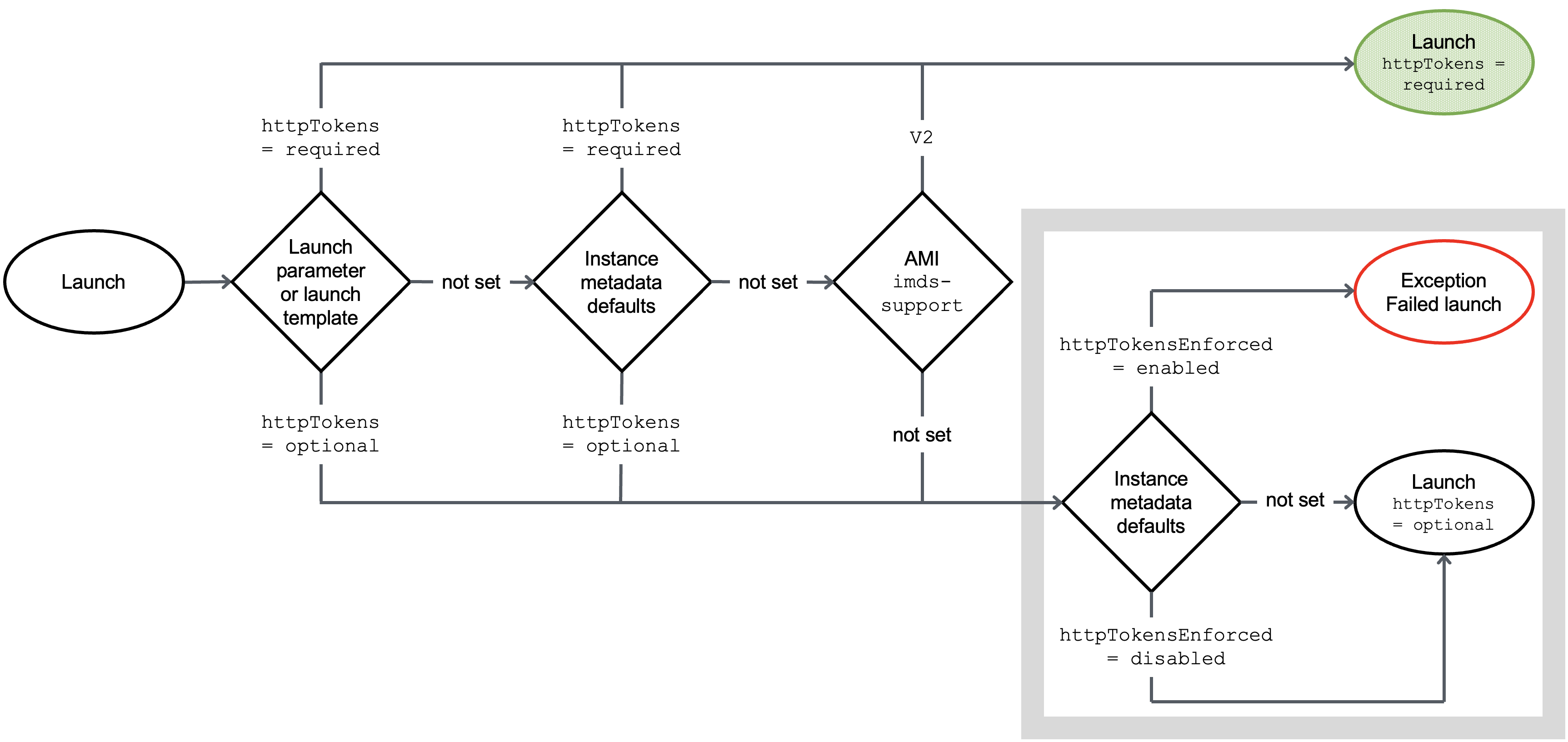
Precedence decides what wins when these layers disagree. <cite index="5-3">If a value is not specified at instance launch it is determined by account-level settings, and if not specified there either, by the AMI configuration.</cite> Instance launch config beats account default beats AMI. Designing that precedence into a landing zone is core security and compliance guardrail work: set the SCP once, and every account inherits the control instead of each team re-deriving it.
The cost you pay later
The trade-off is not the security, it is the maintenance surface. Once you require v2 and enforce it, every new base image, every third-party AMI from the Marketplace, and every migrated server has to be v2-clean before it launches, or the SCP blocks it. That is the point, but it means the SCP is now on the critical path for provisioning. Build the MetadataNoToken and MetadataNoTokenRejected dashboards into standard monitoring so a blocked launch shows up as a known failure mode, not a mystery. Wiring those signals into detection and pipeline gates is where this connects to DevSecOps and detection work: the guardrail is only as good as the alert that fires when someone hits it.
Frequently asked questions
Does requiring IMDSv2 break running applications?
Only if they still call IMDSv1, which is why you audit first. Requiring v2 causes IMDSv1 requests to return 401, so an agent or SDK that never sends a token stops getting metadata. Drive MetadataNoToken to zero on an instance before you set HttpTokens=required on it, and it will not break.
Why do my containers fail after enabling IMDSv2 but standalone instances work?
The default PUT response hop limit is 1, and a container is one extra network hop, so the token response never reaches the process inside the container. Set the hop limit to 2, or 3 if testing shows you need it, using modify-instance-metadata-options. This is the most common IMDSv2 rollout failure and it looks like a network problem, not a metadata one.
Does setting the account default require IMDSv2 on existing instances?
No. The account default and account-level enforcement only affect new launches and block re-enabling v1; they leave existing running instances untouched. To fix instances already running, use modify-instance-metadata-options per instance or the EnforceEC2InstanceIMDSv2 Systems Manager runbook across the fleet.
What is the difference between the SCP condition keys for IMDSv2?
ec2:MetadataHttpTokens and ec2:MetadataHttpPutResponseHopLimit block non-compliant RunInstances calls at launch time, controlling how instances get configured. ec2:RoleDelivery works at the API layer instead: it rejects any API call made with credentials that were delivered over IMDSv1. Use both, so you prevent v1 launches and also neutralise any v1 credentials that slip through.
How do I confirm IMDSv1 is actually gone after enforcement?
Watch MetadataNoTokenRejected in the AWS/EC2 CloudWatch namespace. Because it and MetadataNoToken are mutually exclusive per instance, a non-zero MetadataNoTokenRejected means software is still attempting v1 and being denied, so that caller still needs updating. A flat zero on both, with v2 required, means the transition is clean.