GitHub Actions OIDC to AWS: Kill Long-Lived Access Keys
Title: GitHub Actions OIDC to AWS: Kill Long-Lived Access Keys
To let GitHub Actions deploy to AWS without storing long-lived access keys, register GitHub as an IAM OIDC identity provider (token.actions.githubusercontent.com), create an IAM role whose trust policy pins the aud claim to sts.amazonaws.com and the sub claim to a specific repository and branch, then have the workflow request an OIDC token and call sts:AssumeRoleWithWebIdentity. The workflow gets short-lived credentials that expire after the run, and there is nothing in GitHub secrets to leak or rotate.
That is the whole idea. The details are where people get it wrong, usually by leaving the trust policy wide enough that any repository can assume the role. This article walks the setup on AWS, the trade-offs, and a subject-claim change that landed in 2026 that will bite anyone who hard-codes trust policies.
What to check before you change anything
Do not delete a single access key until you have confirmed three things.
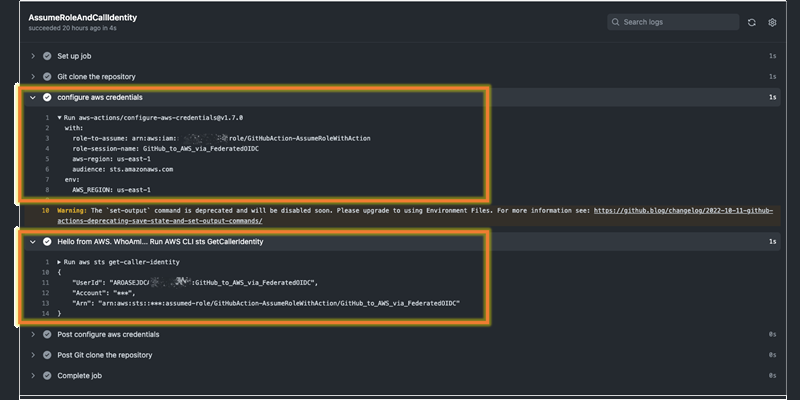
First, inventory what those keys actually do. Look in AWS CloudTrail for the IAM user behind your current deployment credentials and list the API calls it makes. You are going to attach those same permissions to the new role, so you need the real set, not the policy you think is attached. You can confirm the switch later in CloudTrail: filter Event history by event source sts.amazonaws.com, and once OIDC is live you will see AssumeRoleWithWebIdentity and GetCallerIdentity events, which is how you confirm the new role is the one doing the work.
Second, confirm your runners can reach the token endpoint. Self-hosted runners behind a strict egress proxy need to reach GitHub's OIDC issuer and the AWS STS endpoint. GitHub-hosted runners are fine.
Third, check whether an OIDC provider for GitHub already exists in the account. If someone set one up earlier, reuse the existing ARN rather than create a duplicate. List them with aws iam list-open-id-connect-providers.
If you are standing up new accounts as part of a datacentre exit or an on-premises move, this is the right moment to skip stored keys entirely. A pipeline that authenticates with OIDC from day one is one fewer secret to migrate. Our cloud migration team treats CI/CD identity as part of the landing zone rather than an afterthought bolted on after cutover.
Create the OIDC provider and the role
There are two AWS resources: the identity provider (once per account) and the role (one per workload, or per repository).
Register the provider
You no longer need to hunt for a certificate thumbprint. AWS now secures the connection to GitHub using its own library of trusted root certificate authorities to verify the JWKS endpoint's TLS certificate, and GitHub confirmed the integration no longer requires pinning intermediate certificate thumbprints (GitHub Changelog). A thumbprint is only consulted if the IdP relies on a certificate not signed by one of those trusted CAs (AWS IAM docs).
Create it with one CLI call:
aws iam create-open-id-connect-provider \
  --url https://token.actions.githubusercontent.com \
  --client-id-list sts.amazonaws.com
That --client-id-list value becomes the audience GitHub tokens must carry.
Create the role with a scoped trust policy
The trust policy is the security boundary. Use StringEquals, pin the audience, and pin the subject to an exact repository and branch. AWS's own condition-key reference shows the pattern:
{
  "Version": "2012-10-17",
  "Statement": [
    {
      "Effect": "Allow",
      "Principal": {
        "Federated": "arn:aws:iam::111122223333:oidc-provider/token.actions.githubusercontent.com"
      },
      "Action": "sts:AssumeRoleWithWebIdentity",
      "Condition": {
        "StringEquals": {
          "token.actions.githubusercontent.com:aud": "sts.amazonaws.com",
          "token.actions.githubusercontent.com:sub": "repo:org-name/repo-name:ref:refs/heads/main"
        }
      }
    }
  ]
}
In that policy the sub condition key limits the role to a single branch of a single repository (AWS IAM docs). Attach the actual deployment permissions (the ones you pulled from CloudTrail) as the role's permissions policy, not the trust policy.
Wire up the workflow
The job needs id-token: write permission, and it uses the official AWS action to exchange the token for credentials:
name: deploy
on:
  push:
    branches: [ main ]
permissions:
  id-token: write
  contents: read
jobs:
  deploy:
    runs-on: ubuntu-latest
    steps:
      - uses: actions/checkout@v4
      - name: Configure AWS credentials
        uses: aws-actions/configure-aws-credentials@v4
        with:
          role-to-assume: arn:aws:iam::111122223333:role/github-actions-deploy
          aws-region: us-east-1
The permissions: id-token: write block is what lets the runner request an OIDC token in the first place; without it the exchange fails (AWS Elastic Beanstalk docs). After the first run, go back to CloudTrail and confirm you see AssumeRoleWithWebIdentity from the new role before you touch the old keys.
Scope the trust policy so only the right workflow can assume the role
The most common mistake is using StringLike with a wildcard on the subject, for example repo:org-name/*, because it was convenient during testing. The default policy the console generates can allow GitHub Actions from organisations or repositories outside your control to assume the role, so scope it down to a specific organisation and repository.
Prefer StringEquals on an exact sub string. Reach for StringLike only when you genuinely need a pattern, such as any tag under refs/tags/, and keep the repository portion exact.
Use extra claims when the subject is not enough
If you need to trust a reusable workflow or distinguish jobs more precisely, GitHub puts additional claims in the token that you can add as conditions: repository_id, repository_owner_id, actor_id, workflow_ref, workflow_sha, and job_workflow_sha, which let you verify the source of a job even when it calls a reusable workflow (GitHub Changelog). The _id claims are the durable ones, because names can be renamed and reused while numeric IDs cannot.
The 2026 subject-claim change you have to plan for
Here is the part most older tutorials get wrong now. GitHub changed the default subject claim. Previously the sub used only mutable names, for example repo:octocat/my-repo:ref:refs/heads/main. If a repository or organisation name was ever recycled, a new owner could mint tokens carrying the same subject and potentially assume a role that still trusted the old name (GitHub Changelog).
The new format appends immutable owner and repository IDs to the claim, so a subject now looks like repo:octocat@123456/my-repo@456789:ref:refs/heads/main, permanently tied to the original repository. GitHub applies this automatically to repositories created after 15 July 2026, and to renames and transfers after that date, while existing repositories keep the old name-based format until you explicitly opt in (GitHub Changelog).
The trade-off: a trust policy with a hard-coded name-based sub will silently stop matching the day a repository is created new, renamed, or transferred, and the deploy job fails with an assume-role error that looks like a permissions bug. The cost lands later, during an org restructure or a repo move, exactly when you are not thinking about IAM. Two ways to stay ahead of it:
- Confirm the exact subject a workflow emits before you rely on it. GitHub exposes a preview of the subject a repository will produce, so you can read the real string rather than guess (Microsoft Learn).
- Where you can, condition on
repository_idandrepository_owner_idalongside the subject, since those numeric IDs are stable across renames.
This is the kind of drift that turns into a 2 a.m. page. Building the guardrail in from the start, rather than after an incident, is the whole argument behind our DevSecOps practice: security in the pipeline, not bolted on after.
OIDC versus stored access keys
| Consideration | OIDC federated role | Stored IAM access keys |
|---|---|---|
| Credential lifetime | Short-lived, expire after each run | Long-lived until manually rotated |
| Secret in GitHub | None; only a role ARN | Access key ID and secret in secrets |
| Blast radius if leaked | Bounded by role and trust policy | Full key validity until revoked |
| Rotation work | None | Ongoing, and easy to forget |
| Main failure mode | Trust policy stops matching after a rename | Key quietly lives on past its usefulness |
There is no honest reason to keep long-lived deploy keys in GitHub secrets for AWS once OIDC is in place. Once the provider is set up you can begin deleting AWS access keys from your IAM users and issue short-term credentials instead.
Frequently asked questions
Do I still need a certificate thumbprint for the GitHub OIDC provider?
Not for the standard GitHub-to-AWS setup. AWS verifies GitHub's JWKS endpoint using its library of trusted root certificate authorities, and GitHub confirmed the integration no longer requires pinning intermediate thumbprints. A thumbprint is only consulted when an IdP uses a certificate not signed by one of those trusted CAs, which is not the case for GitHub.
Can one role be assumed by several repositories?
Yes, but do it deliberately. Add multiple exact sub conditions rather than a broad wildcard, or condition on repository_id values so a renamed or recycled repository name cannot inherit the trust. A wildcard like repo:org/* trusts every current and future repository in the org, which is almost never what you want for a role that can deploy.
Why did my working deploy suddenly fail with an assume-role error?
Check whether the repository was recently created, renamed, or transferred. Since mid-2026 GitHub uses an immutable subject claim by default for new, renamed, and transferred repositories, so a trust policy pinned to the old name-based sub no longer matches. Read the exact subject the workflow now emits and update the trust policy to match, ideally adding the numeric repository and owner IDs.
What permissions does the workflow itself need?
The job needs id-token: write so the runner can request an OIDC token, plus contents: read for checkout. The AWS credentials themselves come from the role's permissions policy, not from anything in the workflow, so keep that policy scoped to only the API calls your deployment actually makes, which you can confirm from CloudTrail.
Does this work the same for GitLab or other CI systems?
The OIDC mechanism is the same, but the issuer URL and claim names differ. Always pin both the audience and an org-scoped claim, never the audience alone.