Landing Zone IP Address Planning: CIDR Layout Before You Migrate
Before the first workload lands, allocate every VPC and subnet CIDR from a single authoritative source that guarantees no overlap with your other cloud ranges or your on-premises network. On AWS, that source is VPC IP Address Manager (IPAM) with a hierarchical pool structure. Reserve RFC 1918 space deliberately, keep a separate non-routable range for things like Kubernetes pods, and design as if you can never resize a CIDR later, because on AWS you cannot. Landing zone IP address planning is the one decision that is cheap to get right on day zero and expensive to unwind once a hundred workloads depend on it.
This matters most during a migration, when on-premises ranges and new cloud ranges have to coexist and route to each other. Overlap is not a warning you get at deploy time. It is a routing failure you discover weeks later when two subnets that were never supposed to talk suddenly need to.
Check this before you change anything
Do the inventory first. You need a written record of every CIDR already in use before you provision a single VPC.
Start on-premises: every subnet in your datacentre, branch offices, VPN concentrators, and anything a partner routes to you. Then catalogue what already exists in the cloud accounts, including the defaults you did not choose. If you started with AWS Control Tower, be aware that <cite index="e64b4b93-6,e64b4b93-7">the default CIDR range is 172.31.0.0/16, and Control Tower assigns the identical CIDR range to every VPC in every account you create within the organizational unit</cite>. That default overlap is deliberate and it has a consequence: <cite index="e64b4b93-8">due to the default overlap of IP addresses, this implementation does not initially permit peering among any of your Control Tower VPCs in the OU</cite>. If you plan to connect those accounts, you are re-addressing them anyway.
There are ranges you should keep clear even inside RFC 1918. AWS uses some for its own managed services. <cite index="fc78345a-4">AWS Cloud9 and Amazon SageMaker AI use 172.17.0.0/16, and to avoid conflicts you should not use this range when creating your VPC</cite>.
Write down the constraints, not just the ranges
For each network, record whether it needs to route to the cloud, how large it realistically grows, and who owns changes to it. A range that never routes to AWS does not need to be globally unique, and that distinction is what lets you conserve routable space later.
Landing zone IP address planning with a single allocation source
A spreadsheet works until two engineers open it at once. VPC IPAM replaces the spreadsheet with an enforcing service. The model is a tree of pools.
<cite index="47f7e0d1-2,47f7e0d1-3">You first create an IPAM and choose which Region to create it in.</cite> Under it you build a hierarchy: a top-level pool holds your whole supernet, Regional pools sit beneath it, and environment pools (production, pre-production) sit beneath those. Each pool carries allocation rules. <cite index="97f2af99-0">Allocation rules determine whether resources are compliant or noncompliant</cite>, and you set a required minimum and maximum netmask length so that nobody carves a /16 out of a pool meant for /24s.
The part that makes this work across a multi-account landing zone is sharing. IPAM pools are shared with the accounts in your organization, so a VPC created in a workload account draws its CIDR from the central pool and cannot pick something that overlaps. AWS publishes a Terraform reference for exactly this: a pattern to <cite index="8c85a6b0-0,8c85a6b0-1">create a hierarchical, multi-Region IPAM architecture using HashiCorp Terraform, because without proper IPAM, organizations risk IP address conflicts, wasted address space, and complex troubleshooting that can lead to outages and downtime</cite>.
A minimal manual sequence with the CLI, to see the shape before you codify it in Terraform:
# Create the IPAM (operating Regions set explicitly)
aws ec2 create-ipam \
  --operating-regions RegionName=eu-west-1 RegionName=eu-west-2

# Top-level pool, then provision the supernet into it
aws ec2 create-ipam-pool \
  --ipam-scope-id ipam-scope-0abc \
  --address-family ipv4
aws ec2 provision-ipam-pool-cidr \
  --ipam-pool-id ipam-pool-0abc --cidr 10.0.0.0/8

# Regional child pool with an enforced allocation size
aws ec2 create-ipam-pool \
  --source-ipam-pool-id ipam-pool-0abc \
  --locale eu-west-1 --address-family ipv4 \
  --allocation-min-netmask-length 20 \
  --allocation-max-netmask-length 24
Codify it in Terraform once you are happy with the tree. The value is not the tool, it is that allocation becomes a reviewed change instead of a Slack message.
The trade-off you are locking in: size once, live with it
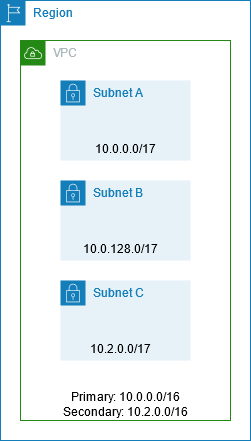
Here is the constraint that drives every sizing decision. On AWS, <cite index="fc78345a-1">the allowed VPC block size is between a /16 netmask and a /28, and you cannot increase or decrease the size of an existing CIDR block</cite>. You do not resize. You add a secondary CIDR, and every secondary CIDR you add fragments the VPC's address story and adds routes that every peer and transit gateway route table has to carry.
That gives you two ways to be wrong. Reserve huge ranges per VPC and you exhaust routable RFC 1918 space fast, which is the exhaustion problem Azure documents plainly: <cite index="e60e0d19-1">corporate networks typically use address spaces from the RFC 1918 ranges 10.0.0.0/8, 172.16.0.0/12, and 192.168.0.0/16, and in on-premises environments these ranges provide enough addresses even for the largest networks</cite>, which is exactly why they run short once every cloud VPC also wants a slice. Reserve too tightly and you are back adding secondary CIDRs and multiplying routes.
Route table capacity used to be the hard ceiling here, and it recently moved. <cite index="cbcd6c7c-0">AWS increased the default routes per route table from 50 to 500 entries</cite>. That buys headroom, but it is not a licence to fragment.
| Sizing approach | Buys you | Costs you later |
|---|---|---|
| Generous per-VPC (for example /20 each) | No secondary CIDRs, clean routing, room to grow | Routable RFC 1918 space runs out; hard to hand a big block to a new region |
| Tight per-VPC (for example /24 each) | Conserves the supernet, many more VPCs fit | Secondary CIDRs when a VPC grows; more routes to propagate everywhere |
| IPAM-enforced pools with min/max netmask | Consistency, no overlap, reclaimable space | Upfront design work; a central team owns allocations |
Azure's own guidance lands in the same place: <cite index="a90d6c11-0">do not create large virtual networks like /16, because it ensures IP address space is not wasted, and the smallest supported IPv4 subnet is /29 and the largest is /2</cite>. Right-size per workload, do not round every VPC up to a /16 out of habit.
Keep routable and non-routable space apart
Not every address needs to be globally unique. Kubernetes pods are the classic case: they consume enormous amounts of address space but only need to be reachable inside the cluster or through a load balancer. Burning routable RFC 1918 space on them is the fastest way to exhaust a landing zone.
The pattern on AWS is to give the VPC a small routable primary CIDR and a large secondary CIDR from carrier-grade NAT space for the pods. AWS's EKS guidance is specific: <cite index="0e627587-0">use CIDRs from the 100.64.0.0/10 shared address space (RFC 6598) as a secondary CIDR because those are less likely to be used in a corporate setting than other RFC 1918 ranges; for example, use 100.64.0.0/16 as a secondary CIDR for your VPC</cite>. Configure the VPC CNI custom networking to place pods there, and your routable footprint per cluster stays small.
Azure solves the same problem through the peering relationship rather than the address family. Its exhaustion guide describes <cite index="e60e0d19-0">using IPv4 subnet peering to exclude one or more subnets from the peering between a landing zone spoke and the hub, so you can assign the same nonroutable ranges to excluded subnets in different spokes</cite>. Same principle: separate the space that has to route across the estate from the space that does not, and reuse the non-routable part.
Decide this before migration, because retrofitting non-routable pod space onto a running cluster means re-IPing pods, which is not a maintenance window anyone volunteers for.
Prove it stays correct
Planning it right on day zero is not the same as keeping it right. Someone will eventually create a VPC by hand or import a legacy range. IPAM monitors for exactly this. The dashboard tracks <cite index="588f5f74-0,588f5f74-1">overlap status, the number of CIDRs that overlap over time via the OverlappingResourceCidrs metric, and warns that overlapping CIDRs can lead to incorrect routing in your VPCs</cite>. It also reports <cite index="588f5f74-2,588f5f74-3">compliance status, the count of resource CIDRs that comply versus do not comply with the allocation rules</cite>. Wire those into your existing alerting so a non-compliant allocation is a ticket, not a discovery during an incident.
If you are standing up a landing zone as part of a datacentre exit, the addressing plan is a hard dependency for the network cutover, and it is worth getting a second set of eyes on before workloads start moving. That is squarely where our cloud migration engineering and landing zone and network architecture work sits: designing the address space for where you will be in three years, not just where the first workload needs to land.
Frequently asked questions
What CIDR block sizes does an AWS VPC allow?
A VPC IPv4 CIDR can be between a /16 and a /28. You can add secondary CIDR blocks after creation, but you cannot resize an existing one, so plan the primary block for the size you expect the workload to reach. Draw from the RFC 1918 private ranges rather than public address space.
Why can't my AWS Control Tower accounts peer with each other?
Because Control Tower assigns the same default CIDR (172.31.0.0/16) to every VPC in an organizational unit, so their address ranges overlap. If you need those accounts connected, re-address them from a planned, non-overlapping pool before you build any dependencies.
Should I use 100.64.0.0/10 for a VPC?
Use it for space that does not need to route across your wider network, most commonly Kubernetes pod ranges as a secondary VPC CIDR. It is RFC 6598 carrier-grade NAT space, so it is unlikely to collide with corporate RFC 1918 addressing. Keep your small routable primary CIDR in standard RFC 1918 space and put the high-volume, non-routable workloads in the CGNAT range.
Do I need VPC IPAM or is a spreadsheet enough?
A spreadsheet can hold the plan, but it cannot enforce it or detect drift. IPAM shares pools across accounts through Resource Access Manager, enforces minimum and maximum netmask lengths per pool, and monitors live resources for overlap and rule compliance. For a single account you may not need it; for a multi-account landing zone that will grow, the enforcement is the point.
What happens if two cloud subnets end up overlapping?
They can each work in isolation, which is why overlap often goes unnoticed at first. The failure appears when they need to route to each other or to a shared on-premises range, because peering and transit gateway route tables cannot resolve duplicate destinations. Fixing it means re-addressing one side, which for anything stateful is a disruptive change, so the cheap fix is to prevent it with a central allocation source up front.