Oracle to PostgreSQL Schema Conversion: What AWS SCT Can't Automate
Title: Oracle to PostgreSQL Schema Conversion: What AWS SCT Can't Automate
Run the assessment report before you convert anything. AWS SCT or the newer DMS Schema Conversion will auto-convert most tables, views, and simple SQL from Oracle to PostgreSQL, but packages, procedures, functions, and anything using PL/SQL or Oracle-specific features need manual work. The report scores that manual effort on a 1-to-10 complexity scale, and that number is the honest input to your migration plan. Oracle to PostgreSQL schema conversion is mostly a code-refactoring project wearing a database costume.
That framing matters because the data movement is the part everyone plans for and the schema and stored-code conversion is the part that slips. Below is what to check first, which tool to use, how to read the assessment, and where the real work lands.
What to check before you convert anything
Two questions decide whether this project is a week or a quarter.
First, does the schema actually belong in a relational engine, and is it yours to move? AWS notes that if your source database supports a commercial off-the-shelf (COTS) application or is vendor-specific, you might not be able to convert it to another database engine. If a vendor owns the schema and the PL/SQL, converting it yourself breaks support and you own every bug afterward. Confirm ownership before anyone opens a tool.
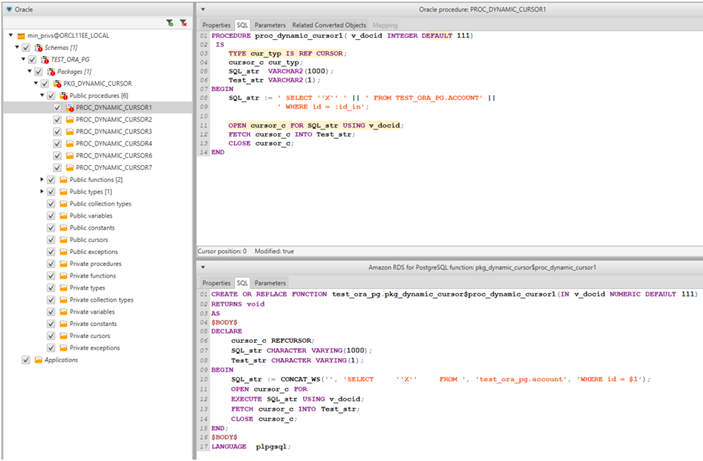
Second, how much logic lives in the database? Oracle uses PL/SQL and PostgreSQL uses PL/pgSQL, and <a>while some table definitions and queries look identical, procedural code often needs modification</a>. A schema that is mostly tables, views, and indexes converts cleanly. A schema with hundreds of packages and triggers is a software port. Count your packages, procedures, functions, and triggers before you estimate anything.
Practical pre-work
- Inventory objects by type and by lines of PL/SQL, not just table count.
- Pick the PostgreSQL target and version now: Amazon RDS for PostgreSQL or Aurora PostgreSQL-Compatible. Emulation options differ by target, covered below.
- Install the JDBC drivers for both Oracle and PostgreSQL if you use the desktop tool. AWS SCT is a Java utility that connects to both ends over JDBC.
- Grant the target privilege SCT needs. To use PostgreSQL as a target, SCT requires the
CREATE ON DATABASEprivilege on each target database.
AWS SCT or DMS Schema Conversion: which tool
There are two tools that do the same conversion, and they are not interchangeable in workflow.
The original AWS Schema Conversion Tool (SCT) is a Java desktop application you install and run locally. It is the more mature and more interactive of the two, good when you need to explore the schema, convert part of it, and iterate.
DMS Schema Conversion (DMS SC) is the fully managed version that runs inside the AWS DMS console, launched to remove the need to download SCT. <a>Previously you had to download AWS SCT to assess and convert schema and code objects; now you can assess, convert, and apply from the console</a>. It runs in a serverless environment you configure through an instance profile, and it reads connection details from data providers backed by AWS Secrets Manager. <a>An instance profile specifies the network and security settings, and a data provider stores the data store type and location for your database</a>.
| AWS SCT (desktop) | DMS Schema Conversion | |
|---|---|---|
| Runs where | Your workstation, Java app | Managed, serverless, in DMS console |
| Best for | Interactive, iterative conversion, exploring a schema | Console-driven workflow, teams already in DMS |
| Setup | Install app plus JDBC drivers | Instance profile, data providers, Secrets Manager |
| Application code conversion | Supported (SQL in app code) | Check current feature parity for your source |
For a first heterogeneous migration where you want to poke at the schema object by object, the desktop SCT is usually the faster path to understanding. If your team already lives in DMS and wants credentials in Secrets Manager and nothing installed locally, DMS SC fits the operating model better. Neither changes the underlying conversion result: the hard objects stay hard.
Run the assessment report first
Before you convert or apply a single object, generate the migration assessment report. This is the whole point of the pre-flight. <a>The assessment report estimates the complexity of your schema conversion, summarises every conversion task, and details the action items for schema that cannot be converted to the target engine</a>. You can view it in the app or export it as CSV or PDF for the people who will not open the tool.
The number that matters is the conversion complexity. <a>The calculation is based on action items, where an action item is a type of problem in the source code that you must fix manually, and a weighted scale runs from 1 for the lowest complexity to 10 for the highest</a>. The report also shows the percentage of syntax elements SCT can convert automatically, broken down by object type.
Assess without connecting to a target
You do not need a running PostgreSQL instance to get a verdict. <a>You can use virtual target database platforms to generate an assessment report and understand migration complexity without connecting to the target</a>. That means you can compare RDS for PostgreSQL against Aurora PostgreSQL on paper before you provision anything.
Read the report by object type. Packages, procedures, and functions are consistently the trouble, because they contain the most custom PL/SQL code, and the tool flags each one with an action item and a hint. Objects that could not be converted automatically are marked and require a manual code change. Sort the action items by object type and severity, and that sorted list is your engineering backlog.
What Oracle to PostgreSQL schema conversion automates, and what it doesn't
The split is predictable once you have run it a few times.
Converts cleanly, most of the time: tables, secondary indexes, sequences, default values, views, and straightforward queries. Do not assume the defaults are right, though. SCT operates with default assumptions about Oracle-to-PostgreSQL mappings that may not be optimal for your data. The classic example is Oracle NUMBER: you have to look at the precision and scale each column actually needs and choose the matching PostgreSQL type rather than accept a blanket mapping.
Converts, but with a behavioural caveat: Oracle-specific constructs that have no direct PostgreSQL twin. SCT converts the ROWID pseudocolumn into a real data column on PostgreSQL so you can keep the information. Sequences convert, but if you use them for integrity constraints you must make sure the migrated sequence values do not overlap existing values. And Oracle object names are uppercase while PostgreSQL folds to lowercase, so plan for the case change across your application queries.
Needs a human: the PL/SQL. Packages, complex procedures, triggers, and dynamic SQL are where your developers spend their time. There are also hard exceptions the tool will not attempt, including SQLJ, .NET stored procedures, spatial data, and RDF graphs, each of which needs a redesign onto a PostgreSQL-native feature such as PostGIS.
Application code counts too
The database is only half of it. Embedded SQL in application code carries the same Oracle idioms, and SCT can convert SQL statements inside application source, translating functions like SYSDATE, NVL, DECODE, and ROWNUM to CURRENT_DATE, COALESCE, CASE, and LIMIT. It still flags dynamic SQL and connectivity code for manual review. If your services carry hand-written SQL, budget that conversion into the same wave, and treat it as the software delivery work it actually is.
The trade-off, and what it costs later
Automated conversion buys speed, and it charges you back in two ways.
The first is the extension pack. When a feature has no PostgreSQL equivalent, SCT substitutes AWS services and emulation functions. It provides an extension pack containing Lambda functions for email, job scheduling, and similar features so that Oracle constructs like UTL_SMTP still work. The catch, stated plainly in the docs: those AWS service emulation features are supported only for databases installed and self-managed on Amazon EC2. If your target is RDS or Aurora, that emulation path is not available, and you refactor the feature instead. Emulation also adds a dependency and a small runtime cost to every call that used to be native.
The second is the load-time exclusions. AWS suggests excluding foreign key constraints, triggers, and secondary indexes from the initial apply script because they can cause problems during the data migration, then recreating them afterward. That is the right call for load performance, but it means your target is not fully constrained until a later step. If you forget to recreate an index or a trigger, you find out in production. Track those excluded objects as an explicit checklist tied to cutover.
The honest summary: SCT gets you a running schema fast, but the emulated features and deferred constraints are debt. Pay it down by refactoring the highest-severity action items to native PostgreSQL rather than leaning on emulation for the long term.
A working sequence
1. Inventory Oracle objects by type; confirm the schema is yours to convert.
2. Choose target: RDS for PostgreSQL or Aurora PostgreSQL, and the version.
3. Generate the assessment report (virtual target is fine at first).
4. Read complexity score + action items by object type and severity.
5. Convert; export the DDL as SQL rather than applying blind.
6. Fix action items in the source, or edit the generated scripts.
7. Exclude FKs, triggers, secondary indexes from the initial apply.
8. Apply schema; then move data (a separate DMS task).
9. Recreate the excluded objects; validate object counts source vs target.
10. Test the application and load-test the target before cutover.
Because conversion is iterative, expect to regenerate the schema several times as you work through the action items until the report is clean enough to commit to. Only then does the data replication and cutover begin, which is a distinct workstream. If you want a second set of hands on the assessment and the cutover plan, that is what our cloud migration practice is built around.
Frequently asked questions
Is DMS Schema Conversion replacing AWS SCT?
DMS Schema Conversion is the managed, console-based option AWS built so you no longer have to download the desktop tool, and it covers assess, convert, and apply. The standalone AWS SCT remains available and is still the more interactive choice for exploring a schema object by object. Pick DMS SC if your team already operates in DMS and wants credentials in Secrets Manager; pick desktop SCT for hands-on iterative conversion.
What percentage of an Oracle schema converts automatically?
There is no universal number, which is exactly why the assessment report exists. It reports the percentage of syntax elements SCT can convert automatically per object type, and scores overall complexity from 1 to 10. Tables, views, and indexes tend to convert cleanly; packages, procedures, and functions carry most of the manual work because they hold the custom PL/SQL.
Can I assess complexity before provisioning a PostgreSQL database?
Yes. SCT supports virtual target database platforms, so you can generate an assessment report and understand migration complexity without connecting to a live target. This lets you compare Amazon RDS for PostgreSQL against Aurora PostgreSQL before you spend money provisioning either one.
What Oracle features cannot be converted automatically?
Custom PL/SQL in packages, complex procedures, triggers, and dynamic SQL routinely need manual work, and some features are outright exceptions, including SQLJ, .NET stored procedures, spatial data, and RDF graphs. Features like Oracle email or job scheduling can be emulated with the SCT extension pack and Lambda, but that emulation is supported only for databases self-managed on EC2, not RDS or Aurora, so those features get refactored instead.
Should I convert the database and the application code together?
Usually yes, because embedded SQL in your application carries the same Oracle idioms as the schema. SCT can convert SQL inside application source and translate functions like SYSDATE and NVL to PostgreSQL equivalents, while flagging dynamic SQL for manual review. Treat the application changes as part of the same migration wave so you are not testing a converted database against un-converted queries.