AWS DMS Data Validation: Prove the Migration Before Cutover
Turn on AWS DMS data validation and it compares every migrated row against the source, using actual values for most columns and a checksum for large objects, then writes any mismatch to an awsdms_control.awsdms_validation_failures_v1 table on the target. It is the difference between believing your migration is correct and being able to prove it before cutover. But it only works on tables with a primary key or unique index, it consumes real resources on both databases, and a naive configuration produces false positives that waste a team's weekend. This is how to run it properly.
What AWS DMS data validation actually does
Validation is not a checksum of the whole table. During validation AWS DMS compares each row in the source with its corresponding row at the target, verifies the rows contain the same data, and reports any mismatches. It does this by issuing queries against both endpoints, so it is separate work from the migration itself and it costs source and target CPU, IOPS and network.
The comparison is type-aware. The value of the columns is compared differently depending on the datatype: a checksum function is used to compare large binary object (LOB) columns, while actual values are used for other datatypes. Under the hood, AWS DMS divides data logically into partitions (the default is 10,000 rows per partition) and compares corresponding partitions using multiple validation threads (the default is five).
When something does not match, AWS DMS creates a table at the target endpoint, awsdms_control.awsdms_validation_failures_v1, and writes diagnostic information there whenever a record enters the ValidationSuspended or ValidationFailed state. That table, not the console, is where you actually diagnose problems.
The states you will see per table
At the table level DMS reports a ValidationState. The ones that matter in practice are Validated (every row checked and matched), Mismatched records, Pending records, Suspended records, and No primary key. A "Mismatched records" state means some rows differ between source and target, and you should check the awsdms_validation_failures_v1 table for the reason; "No primary key" means the table could not be validated because it had no primary key. Treat No primary key as a silent gap: DMS is not telling you those tables are correct, it is telling you it never looked.
What to check before you turn validation on
Validation has hard prerequisites. Confirm these before you change a task, because a task that runs but silently skips tables is worse than one that fails loudly.
Every table needs a key. Data validation requires that the table has a primary key or unique index. Heap tables and tables where you dropped the PK for load performance will report No primary key and go unvalidated. Inventory these first.
Some datatypes are excluded. AWS DMS does not support validating the Oracle Spatial type during heterogeneous migration, and for Microsoft SQL Server versions lower than 2019, validation of NCHAR and NVARCHAR data types is not supported. If you use data masking, note that validation ignores columns with a data masking transformation, and skips an entire table if a masking rule applies to its PK or UK column.
PostgreSQL targets need a helper aggregate on older versions. For PostgreSQL 12 and 13 you must create the BIT_XOR aggregate or validation cannot compute its comparisons:
CREATE OR REPLACE AGGREGATE BIT_XOR(IN v bit)
  (SFUNC = bitxor, STYPE = bit);
RDS forces SSL. Amazon RDS forces an SSL connection by default, so create the DMS endpoint with SSL mode set to "required", or explicitly set rds.force_ssl to 0 in the parameter group if you have a reason to.
LOBs need matching size settings. If you migrate LOBs in Limited LOB mode, validation will report false mismatches unless the sizes line up. When a table has LOB columns and you use Limited LOB mode, set ValidationPartialLobSize to the same value as LobMaxSize. For an Oracle endpoint that uses BLOBs, DMS uses DBMS_CRYPTO to validate them, so grant execute on sys.dbms_crypto to the DMS user account.
Aurora Limitless is out. Data validation does not work with Amazon Aurora PostgreSQL Limitless; those tables report "No primary key". If Limitless is your target, plan a different verification path.
Inline validation versus a separate validation-only task
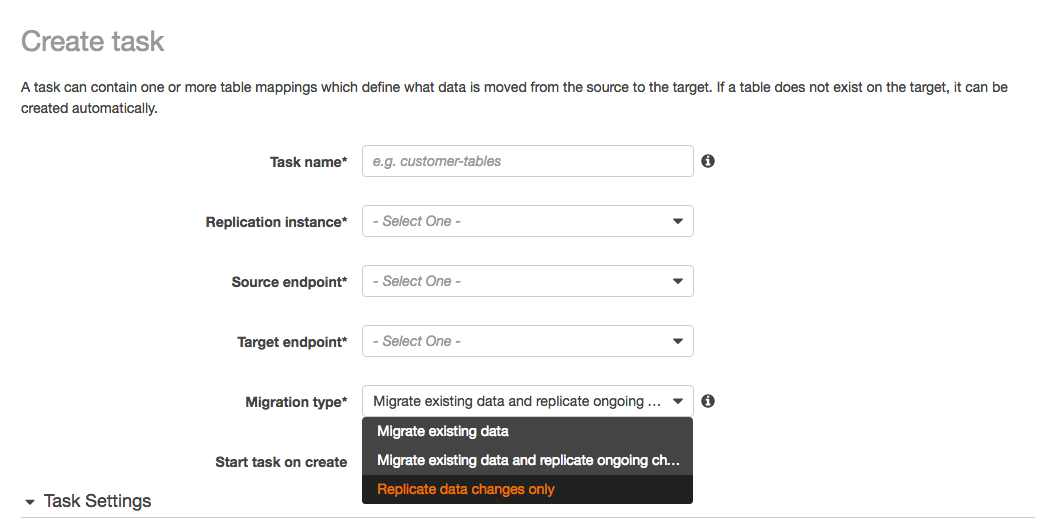
You have two ways to run it, and the choice is a genuine trade-off. You can enable validation on the same task that moves the data, or you can run a dedicated validation-only task that compares without migrating anything. When ValidationOnly is true, the task performs data validation without performing any migration or replication of data.
The distinction that matters at cutover: a full-load validation-only task compares all rows from the source and target in a single pass, immediately reports any failures, and then shuts down, which gives you a clean pass or fail quickly. A CDC validation-only task instead runs continuously and re-validates ongoing changes.
| Option | Best for | The cost you pay |
|---|---|---|
| Validation enabled on the migration task | Full Load + CDC where you want continuous assurance | Validation queries compete with replication for source and target resources; harder to isolate load |
| Full-load validation-only task | A final pre-cutover check on a quiesced or read-only source | You must run it after data movement settles; it is a point-in-time snapshot |
| CDC validation-only task | Long-running ongoing replication you want continuously verified | If most comparisons fail it becomes very slow; it must run in the same direction as replication |
One rule catches teams out. A CDC validation-only task must be set up in the same direction as the replication task, because it detects which rows changed from the source change log; if you point it the other way it only knows about changes DMS already sent and cannot catch replication errors. Running a validation-only task on a separate replication instance is also how you keep validation load off the task doing the real migration, which matters when the source is a production database you cannot slow down. This kind of cutover sequencing is central to a low-risk cloud migration plan.
Reading and acting on validation failures
When a table shows Mismatched records, query the control table directly:
SELECT * FROM awsdms_validation_failures_v1
WHERE TASK_NAME = 'your-task-external-id';
Check the Details column for the reason and use the Key column to compare the specific record between source and target. Most first-run failures fall into a few buckets: LOB size mismatches (fix ValidationPartialLobSize), collation differences, and datatype conversions that legitimately change the stored representation.
Distinguishing real corruption from false positives
DMS is designed to avoid crying wolf on a moving target. A CDC validation-only task delays validation based on average latency and retries failures multiple times before reporting them, because a row being updated on the source right now will legitimately differ from the target for a moment. At the point a discrepancy is found, the thread retries rather than reporting immediately, expecting ongoing replication to fix it; if it matches on a later pass within the retry window, no failure is reported.
That is also why some expected differences never clear. If you are migrating something like Oracle varchar2 to PostgreSQL jsonb, CDC validation keeps retrying and re-reporting those rows; a full-load validation-only task gives you a quicker, definitive answer. For known-acceptable conversions, verify them once with a full-load pass rather than watching CDC churn on them forever.
Tuning validation, and what it costs later
The defaults are conservative. ThreadCount defaults to 5, and raising it lets DMS validate faster but runs more simultaneous queries, consuming more resources on the source and target. A minimal settings block looks like this:
"ValidationSettings": {
  "EnableValidation": true,
  "ThreadCount": 10,
  "PartitionSize": 10000,
  "FailureMaxCount": 10000,
  "TableFailureMaxCount": 1000,
  "HandleCollationDiff": true,
  "RecordFailureDelayLimitInMinutes": 30
}
Know what these thresholds do before you trust a "passed" result. FailureMaxCount defaults to 10,000 and is the number of failed records before validation is suspended for the whole task; TableFailureMaxCount defaults to 1,000 per table. Once a threshold is breached, DMS stops validating that table or task. A run that "finished" may simply have hit its failure ceiling and given up. If you want validation to continue regardless, set FailureMaxCount higher than the number of rows in the source.
Two more levers control false positives versus speed. PartitionSize sets how many records each thread reads per pass, defaulting to 10,000; raising it reads more per pass but adds load. ValidationQueryCdcDelaySeconds delays the first validation query, defaulting to 180 seconds for a validation-only task, and raising it reduces contention when the source has heavy update volume.
The cost you pay later is the honest part. High thread and partition counts shorten the validation window but push load onto a source you may not be able to afford to slow during a live migration. Low thresholds finish fast but can mask real problems. On newer engines the performance picture improved: starting with replication engine version 3.5.4, DMS automatically uses GROUP_LEVEL validation for supported migration paths and defaults to ROW_LEVEL for everything else. The right settings depend on your source's spare capacity and your cutover window, and getting that balance right is exactly the kind of thing worth pinning down in a data engineering and pipelines review before the migration, not during it.
Frequently asked questions
Does AWS DMS validate data automatically during a migration?
No. Validation is off by default. You enable it by setting EnableValidation to true when you create or modify the task. For a Full Load + CDC task, once enabled, AWS DMS begins comparing source and target data immediately after a full load completes for a table and then continues on ongoing changes.
Why does a DMS table show "No primary key" for validation?
Because validation needs row-level identity to compare. Data validation requires a primary key or unique index, so tables without one are skipped and reported as No primary key. The same state also appears if a data masking rule targets the PK or UK column, and for Aurora PostgreSQL Limitless targets. Treat these tables as unverified and check them another way.
How do I run validation without slowing down my migration task?
Use a separate validation-only task, ideally on its own replication instance, so its queries do not compete with the task moving data. Setting ValidationOnly to true runs validation with no data migration or replication. For a one-time move, use the full-load validation-only feature to compare all rows quickly; for ongoing replication, use a CDC validation-only task set up in the same direction as the replication.
Where do I find the actual rows that failed validation?
In a control table on the target database, not the console. DMS writes diagnostic information to awsdms_control.awsdms_validation_failures_v1 whenever a record enters the ValidationSuspended or ValidationFailed state. Query it by task name, read the Details column for the reason, and use the Key column to compare the specific record between source and target.
Why does validation report mismatches on rows that are actually correct?
Usually timing or LOB configuration. On a live source a row can differ from the target for the moment before replication catches up, which is why CDC validation delays and retries before reporting a failure. The other common cause is LOBs in Limited LOB mode: set ValidationPartialLobSize to match LobMaxSize so the compared portions align.