Route 53 Resolver: Hybrid DNS Between On-Prem and AWS
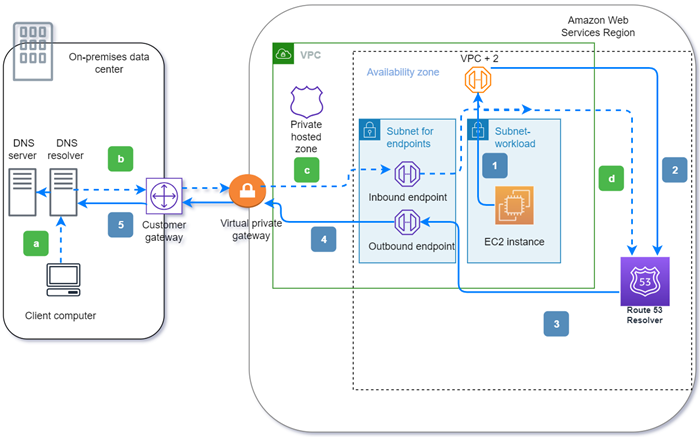
To make on-premises systems and AWS resolve each other's private DNS names while you migrate, use Route 53 Resolver. Create an outbound endpoint with conditional forwarding rules for queries going from your VPCs to on-prem, and an inbound endpoint for queries coming from on-prem to AWS. Both run over Direct Connect or a VPN.
This is the piece of a migration that is invisible until a lift-and-shift server in the cloud tries to reach db.corp.internal and gets NXDOMAIN. The application does not fail at the network layer, it fails at name resolution, and the symptoms look like a dozen other things. Getting Route 53 Resolver hybrid DNS right before you move workloads turns that whole class of problem into a non-event.
What actually breaks without hybrid DNS
Every VPC gets a built-in resolver, the Amazon-provided DNS server that lives at the VPC CIDR base plus two (the .2 address). <cite index="2-13,2-14">An EC2 instance that needs to resolve a name like internal.example.com sends the query to the VPC+2 address in the VPC that connects to Route 53 Resolver.</cite> By default that resolver knows about public DNS and about any private hosted zones associated with the VPC. It knows nothing about your corporate domain living on a Windows DNS or BIND server in the datacentre.
So during a migration you have two gaps, and they are not symmetric:
- Workloads now in the VPC need to resolve on-prem names (
*.corp.internal, Active Directory records, legacy service hostnames) that still live on your internal DNS. - On-prem systems that have not moved yet need to resolve names that now live in AWS, typically records in a Route 53 private hosted zone.
Resolver solves each gap with a separate endpoint. <cite index="1-4,1-5">Inbound endpoints allow DNS queries into your VPC from your on-premises network, and outbound endpoints allow queries from your VPC out to your on-premises network.</cite> You usually need both.
Check these before you create anything
Changing DNS in a running environment is one of the easier ways to cause a wide, confusing outage. Confirm the following first.
Private connectivity already exists and is routable
Resolver endpoints do not use public IPs. <cite index="4-15,4-16">For an inbound endpoint you must set up either a Direct Connect connection or a VPN between your network and the VPC, and for an outbound endpoint you need Direct Connect, a VPN, or a NAT gateway.</cite> The endpoint IPs you create must be reachable from your on-prem resolvers and vice versa, so verify routing on both sides, not just the AWS route tables.
You know who currently answers for each domain
List the authoritative server for every internal zone you care about, and note which zones will move to a private hosted zone and when. The forwarding rules you write encode that split. If you forward corp.internal to on-prem but a subdomain has already been migrated to a private hosted zone, you need to understand precedence (covered below) before you cut over.
Your VPC has spare subnet space in at least two AZs
Each endpoint consumes elastic network interfaces. <cite index="4-7">For each Resolver endpoint you specify two or more IP addresses in different Availability Zones.</cite> Pick subnets with free addresses and make the choice deliberately, because the IPs become fixed infrastructure that your on-prem DNS config will point at.
The security groups allow port 53 on TCP and UDP
<cite index="2-20">Inbound rules must allow TCP and UDP access on port 53.</cite> If you open only UDP you can get intermittent failures that are painful to diagnose.
Outbound resolution: VPC to on-premises
This is the half most migrations need first. You create an outbound endpoint, then one forwarding rule per domain you want to send to on-prem.
<cite index="5-5,5-6">An outbound endpoint specifies the IP addresses that queries originate from, and those are private addresses from your VPC range, which is why each outbound endpoint needs Direct Connect, a VPN, or a NAT gateway.</cite> <cite index="5-8">Each forwarding rule specifies one domain name.</cite>
In Terraform:
resource "aws_route53_resolver_endpoint" "outbound" {
  name      = "hybrid-outbound"
  direction = "OUTBOUND"

  security_group_ids = [aws_security_group.resolver.id]

  ip_address { subnet_id = aws_subnet.resolver_a.id }
  ip_address { subnet_id = aws_subnet.resolver_b.id }
}

resource "aws_route53_resolver_rule" "corp_internal" {
  name                 = "forward-corp-internal"
  domain_name          = "corp.internal"
  rule_type            = "FORWARD"
  resolver_endpoint_id = aws_route53_resolver_endpoint.outbound.id

  target_ip { ip = "10.1.0.10" }  # on-prem DNS server
  target_ip { ip = "10.1.0.11" }
}

resource "aws_route53_resolver_rule_association" "corp_internal" {
  resolver_rule_id = aws_route53_resolver_rule.corp_internal.id
  vpc_id           = aws_vpc.main.id
}
The rule does nothing until it is associated with a VPC. Note that Resolver spreads load across your listed targets: <cite index="5-7">the target IP is chosen at random with no preference, and if a target does not respond Resolver retries.</cite> List at least two on-prem resolvers.
Inbound resolution: on-premises to AWS
The inbound endpoint is the reverse path. <cite index="7-3">You create an inbound endpoint specifying the private IP addresses that your on-premises resolvers will forward DNS queries to.</cite> Then, on your corporate DNS server, add a conditional forwarder that points your AWS-hosted zone (for example aws.example.com, backed by a private hosted zone) at those inbound endpoint IPs.
resource "aws_route53_resolver_endpoint" "inbound" {
  name      = "hybrid-inbound"
  direction = "INBOUND"

  security_group_ids = [aws_security_group.resolver.id]

  ip_address { subnet_id = aws_subnet.resolver_a.id }
  ip_address { subnet_id = aws_subnet.resolver_b.id }
}
The AWS side is small. The work is on your on-prem resolver, where you add the forwarder. Write down the two inbound IPs, because they are now a dependency of your datacentre DNS and will outlive whoever set them up.
One endpoint per direction is normally enough. <cite index="4-5,4-6">You typically need one inbound and one outbound endpoint per Region, and one of each is sufficient to handle the queries for that direction.</cite> Designing the resolver layer into your landing zone early is exactly the kind of thing our cloud architecture practice handles so it is in place before the first server moves.
Rule precedence and the loop you will otherwise create
Two behaviours cause most of the surprises here.
First, matching is longest-prefix. <cite index="6-4">If you have multiple Resolver rules such as example.com and www.example.com, the query is routed by the rule with the most specific domain name.</cite> So you can forward corp.internal wholesale to on-prem while carving out an already-migrated subdomain with a more specific rule or a private hosted zone. Anything that matches no rule falls through to the default: <cite index="8-1,8-2">if a query does not match any other rule, Resolver forwards it based on the autodefined dot (".") rule, which covers all names except some AWS internal domains and private hosted zone records.</cite>
Second, do not create a resolution loop. <cite index="9-2">Avoid associating the same VPC with both a Resolver rule and its own inbound endpoint, which creates a loop.</cite> If a forwarding rule in a VPC points back at the inbound endpoint in that same VPC, queries bounce until they fail.
If you run multiple accounts, you do not rebuild rules everywhere. <cite index="1-6,1-7">Rules are applied to your VPC and can be shared across multiple accounts.</cite> Share them with AWS Resource Access Manager from a central networking account so every spoke VPC inherits the same forwarding behaviour.
Sizing, high availability, and the connection-tracking cliff
This is the trade-off that costs you later if you ignore it. Resolver endpoints have a hard per-IP ceiling, and a security-group footgun that quietly cuts it by most.
<cite index="1-9">Each IP address in an endpoint can process up to 10,000 UDP DNS queries per second.</cite> That is generous, but it is per IP, and the number only holds if your connections are untracked. <cite index="3-3">If connection tracking is enforced by restrictive security group rules or queries are routed through a Network Load Balancer, the overall maximum queries per second per IP address can drop to as low as 1500.</cite>
The fix is counterintuitive: make the security group rules permissive enough that connections are not tracked. <cite index="3-7,3-8">For an inbound endpoint, ingress rules allowing TCP and UDP on port 53 from 0.0.0.0/0, paired with broad egress, keep connections untracked.</cite> Scope the source by network reachability (only your on-prem ranges can route to these IPs anyway) rather than by tight CIDR rules that trip connection tracking.
For availability, spread IPs across AZs and add headroom. <cite index="9-6,9-7">Create endpoints with IP addresses in at least two Availability Zones, and provision additional network interfaces to stay available during maintenance or traffic surges.</cite> If you need more throughput, add IPs to the existing endpoint rather than standing up a second one.
| Outbound endpoint | Inbound endpoint | |
|---|---|---|
| Direction | VPC queries to on-prem | On-prem queries to AWS |
| Carries | Forwarding rules (FORWARD, one domain each) | No rules; just a resolution target |
| Connectivity needed | Direct Connect, VPN, or NAT gateway | Direct Connect or VPN |
| Where you configure the other side | Target IPs in the rule | Conditional forwarder on your on-prem DNS |
| Typical count per Region | One | One |
Sequencing it into a migration
Stand up the endpoints and rules while everything still runs on-prem, and test resolution from a throwaway EC2 instance before you move anything real. Verify both directions: forward-lookup an on-prem name from the VPC, and forward-lookup an AWS private hosted zone record from an on-prem host. Only then start shifting workloads. DNS that already works in both directions removes an entire failure mode from cutover day, which is the whole point of planning a migration so the cutover is boring. If you want a second set of eyes on the wave plan and the resolver topology, that is core to our cloud migration work.
Frequently asked questions
Do I need both an inbound and an outbound Resolver endpoint?
It depends on which direction queries flow. If workloads in AWS need to resolve on-prem names, you need an outbound endpoint with forwarding rules. If on-prem systems need to resolve names hosted in AWS private hosted zones, you need an inbound endpoint. During a migration both are usually true, so most teams deploy both.
How much throughput does a Route 53 Resolver endpoint give me?
Each IP address in an endpoint can handle up to 10,000 UDP DNS queries per second, and an endpoint has at least two IPs. That ceiling only holds with untracked connections; restrictive security group rules or routing through a Network Load Balancer can push the per-IP limit down to around 1,500 queries per second. Add IP addresses to scale horizontally.
Why do my DNS queries fail for some names but not others?
Resolver matches the most specific domain name among your forwarding rules, and anything unmatched follows the default autodefined "." rule to public or Amazon DNS. If a name is not covered by a forwarding rule or a private hosted zone, it never reaches your on-prem resolver. Check which rule a given name actually matches before assuming the endpoint is broken.
Can I share forwarding rules across multiple AWS accounts?
Yes. Forwarding rules are associated with VPCs and can be shared across accounts using AWS Resource Access Manager. Build the rules once in a central networking account and share them so every workload VPC inherits consistent hybrid DNS behaviour instead of each team reinventing it.
What connectivity do Resolver endpoints require?
Endpoint IPs are private, so you need an existing path between AWS and your network. Inbound endpoints require Direct Connect or a VPN. Outbound endpoints accept Direct Connect, a VPN, or a NAT gateway, and the target on-prem resolvers must be routable from the endpoint subnets.