Active Directory on AWS During Migration: AD Connector vs Managed AD
When you migrate Windows workloads to AWS, the question of how to handle Active Directory on AWS during migration comes down to one trade-off: keep your on-premises domain authoritative and proxy to it, or stand up a managed directory in AWS and trust back to on-premises. Use AD Connector when you want EC2 instances and AWS applications to authenticate against your existing domain with nothing cached in the cloud. Use AWS Managed Microsoft AD with a trust when you need Amazon RDS for SQL Server, FSx for Windows File Server, resilience that survives a link outage, or you are moving the directory itself. The deciding factors are which AWS services you run and how much you can tolerate depending on the on-premises link.
Neither choice is reversible for free. Instances joined to a domain carry that domain's SID and DNS in their configuration, so switching directory strategy after cutover means re-joining machines. Decide this before you replicate a single server.
Check these before you change anything
The directory decision fails on the network far more often than on the directory itself. Confirm the following first.
Network path and DNS
Both options require routed, low-latency connectivity between your VPC and your domain controllers, over Direct Connect or a VPN. AD Connector is a gateway that redirects directory requests to your on-premises AD, so if the link is down, authentication in AWS stops. For that path to work, <cite index="ad_connector_getting_started-firewall">the firewall for your existing network must have the required Active Directory ports open to the CIDRs for both subnets in the VPC</cite> where the connector lives.
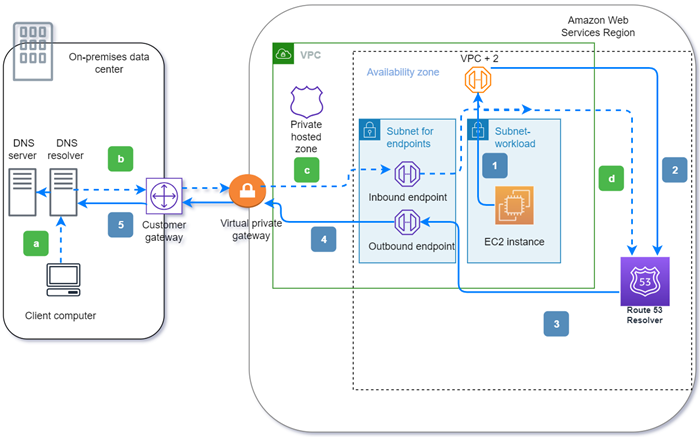
DNS resolution has to point at your domain controllers, not the VPC default resolver, for the AWS-side subnets. If you go the trust route instead, your on-premises DNS needs a conditional forwarder for the AWS directory's domain, and the AWS side needs one back.
Active Directory sites and subnets
This is the quiet failure. <cite index="ad_connector_best_practices-sites">To discover domain controllers, AD Connector uses the Active Directory site whose subnet IP address ranges are close to those in the VPC that contains the AD Connector, so if you have a site whose subnets have the same IP address ranges as those in your VPC, it will discover the domain controllers in that site, which may not be physically close to your Region.</cite> Define your VPC CIDRs as subnets in a dedicated AD site that maps to the right domain controllers before you connect anything. If you skip this, authentication works but routes to a domain controller three regions away, and you spend a week blaming latency on the wrong layer.
Service account and directory hygiene
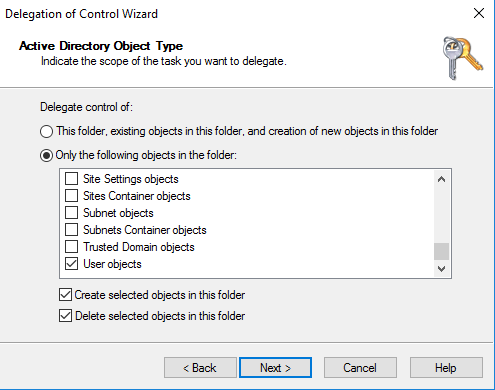
AD Connector needs a delegated service account. Do not hand it Domain Admin. <cite index="ad_connector_getting_started-serviceaccount">While members of the Domain Admins group have sufficient privileges to connect to the directory, as a best practice you should use a service account that only has the minimum privileges necessary</cite>, typically by creating a dedicated group, delegating the join and read privileges to it, and adding the account there. A few more prerequisites bite people at cutover:
- <cite index="ad_connector_getting_started-rodc">AD Connector does not support read-only domain controllers (RODC) when used in combination with the Amazon EC2 domain-join feature.</cite>
- <cite index="ad_connector_getting_started-preauth">User accounts must have Kerberos preauthentication enabled.</cite>
- If you plan to use Amazon WorkSpaces, the
DisableVLVSupportLDAPattribute must be set to 0 on your domain controllers, which is the default.
Option A: AD Connector, the fast path that keeps on-premises authoritative
AD Connector is a proxy. It holds no directory data. <cite index="directory_ad_connector-overview">Use AD Connector to redirect directory requests to your on-premises Microsoft Active Directory without caching any information in the cloud.</cite> Under the hood it is read-mostly and Kerberos-based: <cite index="ad_connector_getting_started-kerberos">AD Connector uses Kerberos for authentication and authorization of AWS applications, and LDAP is only used for user and group object lookups (read operations), so nothing is mutable and credentials are not passed in clear text.</cite>
This is the right tool when your identities stay on-premises and you are early in a migration. Your users sign in to migrated EC2 instances and to AWS applications with existing corporate credentials, and you have not duplicated your directory.
The constraints matter, and they are structural, not tunable:
- It is a one-to-one gateway. <cite index="directory_ad_connector-relationship">AD Connector does not support Active Directory transitive trusts, and AD Connectors and your on-premises Active Directory domains have a one-to-one relationship, so for each on-premises domain, including child domains in a forest you want to authenticate against, you must create a unique AD Connector.</cite> A multi-domain forest means multiple connectors.
- It is not shareable or multi-VPC. <cite index="directory_ad_connector-vpc">AD Connector cannot be shared with other AWS accounts, and it is not multi-VPC aware, which means AWS applications like WorkSpaces are required to be provisioned into the same VPC as your AD Connector.</cite> In a landing zone with per-account VPCs, that is a real limit.
- Some managed services will not work with it. <cite index="directory-services-options-serviceco">Amazon RDS for SQL Server and Amazon FSx for Windows File Server are not compatible with AD Connector; RDS for SQL Server is compatible with AWS Managed Microsoft AD only, and FSx for Windows File Server can be deployed with AWS Managed Microsoft AD or self-managed Active Directory.</cite> If your migration includes Windows-authenticated SQL Server on RDS or a managed Windows file share, AD Connector is already ruled out.
A minimal AD Connector, expressed in Terraform, is small. The point is that all of the risk sits in connect_settings, the network side:
resource "aws_directory_service_directory" "connector" {
  name     = "corp.example.com"
  password = var.service_account_password
  size     = "Small"
  type     = "ADConnector"

  connect_settings {
    customer_dns_ips  = ["10.0.4.10", "10.0.4.11"] # on-prem DCs
    customer_username = "svc-adconnector"          # delegated, not Domain Admin
    subnet_ids        = [aws_subnet.dir_a.id, aws_subnet.dir_b.id]
    vpc_id            = aws_vpc.main.id
  }
}
One operational note that catches people: do not reuse the directory's security group. <cite index="ad_connector_best_practices-sg">AWS may modify the directory security group without notice to address functional or security needs, and such changes affect any instances you associate it with and may disrupt their operation, so associating it with your own EC2 instances is discouraged.</cite>
Option B: AWS Managed Microsoft AD with a trust
Here you run real domain controllers in AWS. <cite index="directory-services-options-managedad">By default, each AWS Managed Microsoft AD has a minimum of two domain controllers, each deployed in a separate Availability Zone for resiliency, all exclusively yours, and AWS provides operational management to monitor, update, back up, and recover the domain controller instances.</cite> You still administer users and group policy with the normal AD tools from a domain-joined Windows machine.
For a migration you usually do not want a second, disconnected identity island, so you connect the two with a trust. <cite index="ms_ad_setup_trust-directions">AWS Managed Microsoft AD supports one-way and two-way external and forest trust relationships between the AWS directory and self-managed on-premises directories, in all three directions: incoming, outgoing and two-way.</cite> The direction you need depends on what consumes the identities:
- <cite index="ms_ad_setup_trust-apps">A two-way trust is required for AWS enterprise apps such as IAM Identity Center, WorkSpaces, WorkDocs, WorkMail, Amazon Chime and the AWS Management Console, while Amazon EC2, Amazon RDS and Amazon FSx will work with either a one-way or two-way trust.</cite>
- If you want to limit exposure, <cite index="ms_ad_setup_trust-selective">you can enable selective authentication so that only the AWS application-specific service account can query your self-managed Active Directory.</cite>
Setup is prerequisite-heavy. You need the network path first, then conditional forwarders on both sides so each forest can resolve the other. Two gotchas: <cite index="ms_ad_setup_trust-sld">AWS Managed Microsoft AD does not support trusts with single-label domains</cite>, and the on-premises DNS work (a new conditional forwarder pointing at the AWS directory's DNS addresses) has to be done by hand on your domain controllers.
Choose this path when you need the managed services AD Connector cannot serve, when you want authentication in AWS to keep working if the on-premises link drops, or when the migration's actual goal is to move the directory off your own hardware. <cite index="ad_connector_best_practices-choice">AWS Managed Microsoft AD is the better choice if you have more than 5,000 users and need a trust relationship set up between an AWS-hosted directory and your on-premises directories, whereas AD Connector is the better choice when you simply want to use your existing on-premises directory with AWS services.</cite>
AD Connector vs AWS Managed Microsoft AD at a glance
| Factor | AD Connector | AWS Managed Microsoft AD |
|---|---|---|
| Directory data in AWS | None, proxies to on-premises | Two DCs in AWS, across AZs |
| Survives link outage | No, auth depends on the link | Yes, DCs run in AWS |
| RDS for SQL Server / FSx | Not compatible with RDS SQL Server | Supported |
| Multi-domain / multi-VPC | One connector per domain, single VPC | Trust covers the forest |
| Enterprise apps (IAM Identity Center, WorkSpaces) | Same-VPC constraint | Two-way trust required |
| Ongoing ops | You patch on-premises DCs | AWS patches and backs up the DCs |
| Best fit | Early migration, identities stay put | Directory move, managed-service dependencies |
How instances actually join, and where cutover risk lives
For either option, migrated EC2 Windows instances can be joined without touching each box by hand. <cite index="ad_connector_join_instance-seamless">You can seamlessly join an Amazon EC2 instance to your Active Directory domain when the instance is launched, and if you need to join it manually you must launch it in the correct AWS Region, security group and subnet, then join it to the domain.</cite> In practice you attach an IAM role with the SSM directory permissions and reference the directory ID in the launch, and SSM performs the join.
The cutover risk is not the join command, it is ordering. Domain-join the replicated instance only after DNS, the AD site definition and the service account are all in place. A machine that joins against the wrong site, or before conditional forwarders exist, comes up "working" and then intermittently fails Kerberos in ways that look like application bugs. Sequencing the directory ahead of the server cutover is exactly the kind of dependency mapping that belongs in a runbook, the same discipline we bring to an end-to-end cloud migration engagement.
The trade-off and what it costs later
AD Connector is cheaper to stand up and keeps a single source of truth, but it hard-couples AWS authentication to your on-premises link and closes the door on RDS for SQL Server and managed Windows file shares. If your three-year plan includes those services, or link independence, you will migrate the directory eventually, and doing it after workloads are live means re-joining machines and re-testing every application's authentication.
AWS Managed Microsoft AD costs more to run and adds trust and DNS plumbing, but it decouples AWS from the link and unlocks the managed services. The honest answer is that it depends on where you are heading: if the directory itself is staying on-premises for the foreseeable future and you only need EC2 and a couple of AWS apps, AD Connector is the pragmatic call; if you are consolidating identity or you need the managed data services, pay the setup cost now. Getting identity right at the landing-zone stage is squarely a cloud architecture concern, and it is far cheaper to design than to unwind.
Frequently asked questions
Does AD Connector store passwords or replicate my directory to AWS?
No. It is a stateless gateway that forwards requests to your on-premises domain controllers and caches nothing in the cloud. Authentication uses Kerberos, and LDAP is used only for read lookups, so credentials are never passed in clear text and no directory objects are modified in AWS. If the network path to your domain controllers is down, AWS-side authentication stops, because there is nothing local to fall back on.
Can I use Amazon RDS for SQL Server with Windows authentication through AD Connector?
No. RDS for SQL Server is compatible with AWS Managed Microsoft AD only, and FSx for Windows File Server needs AWS Managed Microsoft AD or a self-managed directory. If your migration includes either service with Windows authentication, plan for AWS Managed Microsoft AD with a trust from the start rather than discovering the limit mid-cutover.
One-way or two-way trust for AWS Managed Microsoft AD?
Amazon EC2, RDS and FSx work with a one-way trust, so if those are all you need, a one-way outgoing trust from the AWS directory is enough. AWS enterprise apps such as IAM Identity Center, WorkSpaces, WorkDocs and the AWS Management Console require a two-way trust. You can add selective authentication to restrict which accounts the AWS side can query against your on-premises directory.
Why do my domain joins pick a domain controller in the wrong location?
Almost always an Active Directory sites-and-subnets problem. AD Connector locates domain controllers using the AD site whose subnet ranges are closest to your VPC CIDRs, so if another site already claims those ranges, it selects domain controllers there. Define your VPC subnets in a dedicated AD site mapped to the correct domain controllers before you connect, and the discovery follows the path you intend.
Can I switch from AD Connector to AWS Managed Microsoft AD after migrating?
Yes, but not cheaply. Instances already joined to a domain through AD Connector must be re-joined when you change directory strategy, and every application that relies on Windows authentication needs re-testing. That is why the directory choice belongs at the planning stage, before you replicate servers, rather than as a fix after cutover.