AWS MGN Cutover: Test, Launch, and Finalize Safely
An AWS MGN cutover is the short window where Application Migration Service deletes your test instance, launches a fresh EC2 instance from the latest replicated block data, and leaves replication running so you can still back out. The migration lifecycle moves through replication, test, ready for cutover, cutover in progress, and cutover complete. Nothing is irreversible until you choose Finalize cutover, which is the step that stops replication and discards the staging resources. So the safe pattern is: validate on a test instance, cut over during a planned window, run acceptance tests against the real cutover instance, and only finalize once you are certain.
MGN (now branded AWS Transform MGN, formerly CloudEndure Migration) performs continuous block-level replication of your source servers and converts them for launch on AWS. The automation is genuinely good. The failures come from skipping the checks before you install the agent, and from misunderstanding what each lifecycle button actually does. This article covers both.
What to check before you install the agent
The replication agent is easy to roll out, which makes it easy to roll out onto servers MGN cannot properly handle. Check these first, because the cost of discovering them mid-wave is a blown cutover window.
Storage topology
MGN replicates block storage that is directly attached to the server. It does not support network-attached storage, NFS shares, or CIFS/SMB shares: only block-level storage visible to the agent at migration time. The same guidance notes this limits applicability for most clustered systems, since clusters usually depend on shared storage. If a server mounts a NAS volume, that data is not coming across with the block replication and you need a separate plan for it (DataSync, a database-native method, or re-pointing the mount after cutover).
Change rate versus bandwidth
High-write workloads are the other common trap. AWS's own guidance flags that systems with a high rate of data changes, such as OLTP databases, can have higher network requirements that complicate migration, and that MGN has no offline shipping option the way Snowball does. If the daily change rate on a database exceeds your available throughput to AWS, replication lag never closes and the server never reaches a clean cutover point. For those, decouple the database and migrate it with a database-native method while rehosting only the stateless application servers.
Platform and OS
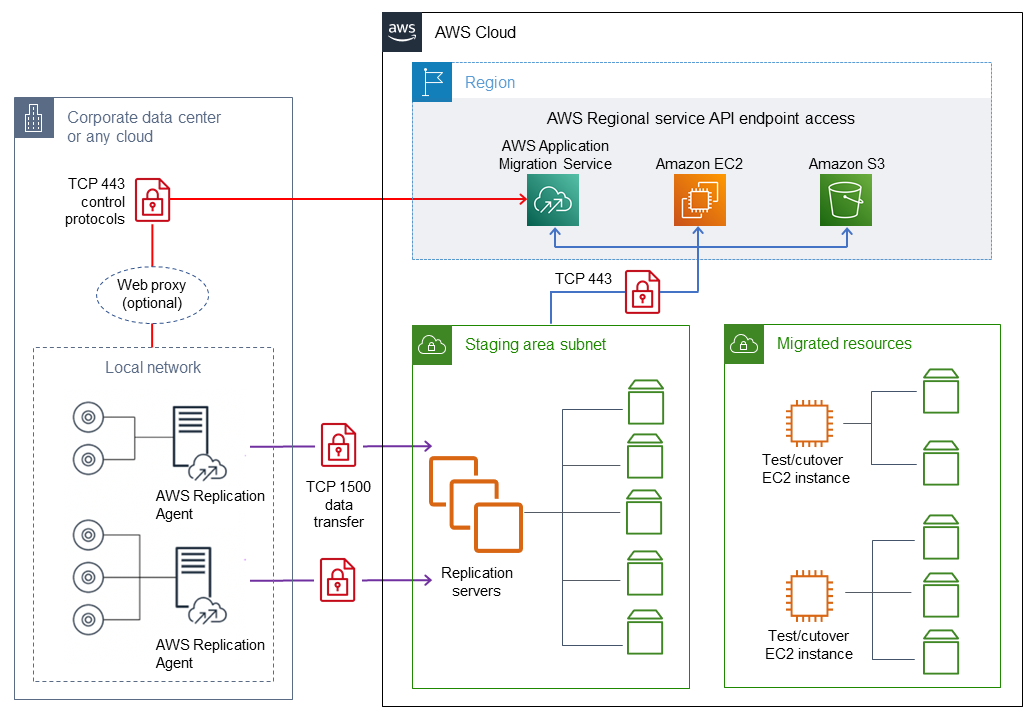
The agent supports x86 Windows and Linux only; non-x86 platforms are out of scope. On the source side, agents reach AWS over two ports: TCP 443 to the Service Manager and TCP 1500 for replication to AWS. Two constraints catch people here: the replication port cannot be changed from 1500, and a web proxy cannot sit between the source server and the staging subnet for the 1500 traffic. If your egress policy forces everything through a proxy, you need a direct path for replication over Direct Connect or VPN.
Staging subnet and endpoints
Before you touch the console, create a dedicated subnet for the staging area. The replication servers MGN launches there must reach the MGN API endpoint at https://mgn.<region>.amazonaws.com, and both the agent installer and the staging subnet need access to Amazon S3 to download software. AWS recommends a new, dedicated subnet rather than reusing an existing one. Replicated data is encrypted in transit with TLS 1.2 and at rest with EBS encryption.
Getting your landing zone, networking and identity right before the first wave is exactly the kind of foundational work that pays off for every server afterwards. If you are standing up the target account structure from scratch, our cloud migration service and cloud architecture practice exist for this.
The MGN lifecycle from agent to cutover complete
Once the prerequisites hold, the flow is mechanical. Install the agent on each source server. On Linux you download aws-replication-installer-init.py with wget and run it; it prompts for region, access key, and the disks to replicate.
wget -O ./aws-replication-installer-init.py \
  https://aws-application-migration-service-<region>.s3.<region>.amazonaws.com/latest/linux/aws-replication-installer-init.py
sudo python3 aws-replication-installer-init.py
After install, the server appears in the console and runs an initial sync, then switches to continuous replication. From there the Migration lifecycle column walks through these states:
| Stage | What it means | Billing note |
|---|---|---|
| Ready for testing | Initial sync done, replication healthy | Staging EBS and replication servers billed |
| Test instance launched | A real EC2 instance booted from replicated data | EC2 + EBS for the test instance billed |
| Ready for cutover | Testing finalized, replication still running | Test instance can be terminated to save cost |
| Cutover in progress | Cutover instance launched, not yet finalized | Replication continues, so you can revert |
| Cutover complete | Finalized, replication stopped | Staging resources released |
Note the free-period detail when you plan a large wave: MGN gives a free period of 2,160 hours (90 days of continuous replication) per source server, starting when the agent is installed. You still pay for the EC2 and EBS resources MGN provisions for replication and for any test or cutover instances during that period. Installing agents months ahead of a cutover burns that clock.
Testing before the AWS MGN cutover
Do not treat the test instance as a formality. AWS recommends running a test at least two weeks before you plan to migrate, specifically so you have time to find and fix problems before the real window. After the test instance launches, connect over SSH or RDP and verify the application actually works, not just that the box boots.
A few operational limits worth knowing: you can launch up to 100 source servers in a single operation, Windows source servers need at least 2 GB free to launch a test instance, and test instances consume billable resources, so terminate them once you have confirmed they work. Terminating a test instance does not affect replication.
When testing is done, use Mark as "Ready for cutover". The console offers to terminate the test instances at that point, which is recommended because you keep paying for them otherwise. If you need another round of tests, Revert to "ready for testing" sends the server back a stage.
Use the test window for post-launch automation
MGN can run predefined post-launch actions on the launched instance, such as installing the CloudWatch agent, installing the SSM agent, running EC2 connectivity checks, validating volume integrity, and validating disk space. Wire these up and test them against the test instance so the cutover instance comes up already registered with your observability and patching tooling. Building that paved road is the sort of thing our platform and DevOps and reliability and SRE teams set up once and reuse across every wave.
The cutover itself, and how to back out
When you start a cutover, MGN first deletes any previously launched test instance and dependent resources, then launches a new cutover instance reflecting the most up-to-date state of the source. Crucially, after the cutover, data replication continues as before. The migrated data keeps flowing to the staging subnet, not to the running cutover instance. That is what gives you a way out.
The sequence at the window:
- Confirm the server shows Ready for cutover and Healthy data replication.
- Launch the cutover instance. Lifecycle moves to Cutover in progress.
- SSH or RDP into the cutover instance and run acceptance tests.
- Turn on Termination Protection after testing and before you finalize, so nobody deletes the instance you just migrated.
- Only then switch DNS or traffic to the new instance.
If the cutover instance fails validation, choose Revert to "ready for cutover". This returns the server's lifecycle to Ready for cutover as if the cutover never happened, with the option to delete the cutover instances to save cost. Because replication kept running, you can relaunch cleanly.
Finalize cutover is the one-way door. It changes the status to Cutover complete and stops data replication, releasing the staging resources. Do not finalize on cutover day unless you are certain. Many teams leave servers in "cutover in progress" for a few days of production soak, accepting the replication cost as insurance, and finalize only once confidence is high. That is a deliberate trade: ongoing replication charges in exchange for a fast rollback path.
The rehost trade-off and what it costs later
MGN is a rehost tool. It moves the machine as-is, which is its strength and its bill later. You inherit the source server's sizing, its OS version, its drift, and its undocumented local configuration, now running on EC2 where idle oversized instances cost real money every hour.
The honest framing from AWS is that rehosting is a fast first step toward modernization, not the destination. That is fair. A lift-and-shift gets you out of the datacentre on a deadline; it does not right-size instances, move you to managed services, or remove the patching you still own. Budget a follow-up pass to resize based on CloudWatch data, replace self-managed databases with RDS or Aurora, and retire the servers that only existed to prop up on-prem constraints. If you finalize and walk away, the cloud bill will quietly be larger than the datacentre it replaced.
The decision is rarely rehost versus refactor for the whole estate. It is rehost the bulk to hit the exit date, carve out the handful of high-change databases and clustered systems for a native migration method, and schedule the modernization work as its own project afterward.
Frequently asked questions
What is the difference between an MGN test instance and a cutover instance?
Both are real EC2 instances booted from replicated block data, and both cost money while running. The difference is lifecycle intent: a test instance is for validation and you terminate it when done, while a cutover instance is the one you keep. When you start a cutover, MGN deletes the latest test instance first, then launches the cutover instance from the most current data.
Can I undo an MGN cutover?
Yes, until you finalize. After cutover, replication keeps running, so Revert to "ready for cutover" returns the server to its pre-cutover state and lets you relaunch. Once you choose Finalize cutover, replication stops and staging resources are released, so that step is not reversible.
What ports does the AWS Replication Agent need?
The agent uses TCP 443 to reach the Service Manager and TCP 1500 for replication. Port 1500 cannot be changed and cannot be routed through a web proxy, so plan a direct network path (Direct Connect or VPN) for replication traffic if your egress policy forces proxying.
Does MGN work for databases?
It can, with caveats. MGN replicates directly attached block storage, so it does not support NAS or shared storage, and high-write OLTP databases may generate more change than your bandwidth can keep up with. For clustered databases or high change rates, decouple the data layer and use a database-native migration method, and rehost only the application tier with MGN.
How long can I run MGN before it starts charging?
Each source server gets a free period of 2,160 hours, which is 90 days of continuous replication, starting when you install the agent. You still pay throughout for the AWS infrastructure MGN provisions to replicate, plus any test or cutover instances, so installing agents long before cutover wastes the free window.