
AWS SCPs for a Landing Zone: Guardrails Before You Migrate
Attach a small set of deny-based Service Control Policies to your organization before you move a single workload: deny leaving the organization, restrict to your approved Regions, block the root user in member accounts, and protect your logging and guardrails from being disabled. SCPs set the maximum permissions any account can ever use, so getting them in place first means every migrated workload lands inside the fence instead of outside it.
That is the whole argument for doing this early. A landing zone is easy to lock down when it is empty. Once you have a hundred rehosted servers, an RDS fleet, and three teams with their own IAM roles, every restriction you add becomes a change request with a blast radius. This article covers exactly which AWS SCPs for a landing zone to write, where to attach them, the trade-off between a deny list and an allow list, and what to verify before you touch anything.
What an SCP actually does, and what it does not
An SCP is a filter, not a grant. <cite index="1-4,1-5">Service control policies are meant to be used as coarse-grained guardrails, and they don't directly grant access; the administrator must still attach identity-based or resource-based policies to IAM principals or resources in your accounts to actually grant permissions.</cite> The permissions a role can actually use are the intersection of what the SCP allows and what the identity policy grants. If either side says no, the answer is no.
This matters because people expect an SCP to hand out access. It never does. If you attach a policy that allows only s3:* and nothing else, your admins do not suddenly get S3 admin. They get S3 only if their IAM policy already granted it, and everything else they had is now cut off.
The FullAWSAccess policy is load-bearing
When you enable SCPs, AWS does not start from a blank deny. <cite index="0-1,0-2,0-3">When you enable SCPs, AWS Organizations attaches an AWS managed SCP named FullAWSAccess, which allows all services and actions; if this policy is removed and not replaced at any level of the organization, all OUs and accounts under that level would be blocked from taking any actions.</cite> Leave that policy in place unless you are deliberately switching to an allow-list model. Removing it by accident is the single most common way people take an organization offline.
How inheritance is evaluated
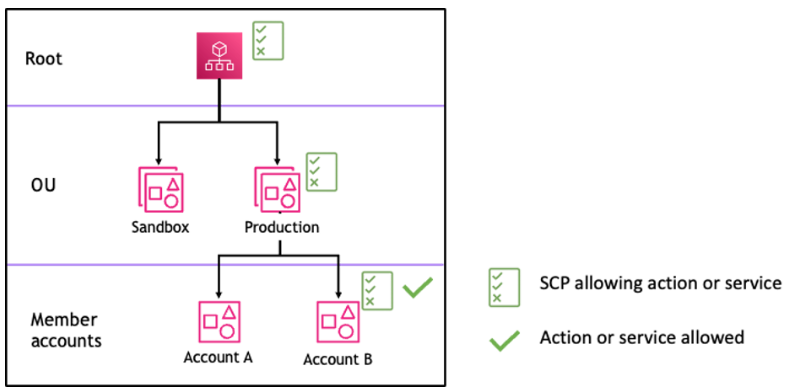
SCPs flow down the tree, and the two effects behave differently. <cite index="0-0">For a permission to be allowed for a specific account, there must be an explicit Allow statement at every level from the root through each OU in the direct path to the account, including the target account itself.</cite> Deny is simpler and blunter: <cite index="0-6">a deny policy attached to any level in the organization is evaluated for all the OUs and member accounts underneath it.</cite> This is why baseline guardrails are almost always written as Deny statements. One deny at the root, or on an OU, covers everything below it without you touching a single account.
The baseline SCPs to attach before you migrate
These are the guardrails worth having in place before workloads arrive. All of them are deny-based, so they layer cleanly on top of the FullAWSAccess policy without breaking existing grants.
Deny leaving the organization
If a member account can leave the organization, an attacker who compromises it can detach it and drop every governance control you have. Block it. <cite index="7-3">To prevent member accounts from leaving your organization, implement an SCP that denies the organizations:LeaveOrganization action for member accounts.</cite>
{
  "Version": "2012-10-17",
  "Statement": [
    {
      "Effect": "Deny",
      "Action": "organizations:LeaveOrganization",
      "Resource": "*"
    }
  ]
}
If you run a business model where accounts legitimately move in and out, do not apply this at the root. <cite index="7-6">Consider creating dedicated OUs for different account lifecycle stages such as onboarding, active, and off-boarding, and apply the deny-leave SCP only to OUs containing accounts that should remain under long-term governance.</cite>
Restrict to your approved Regions
Most teams operate in two or three Regions. Denying everything else shrinks your attack surface and stops shadow resources appearing in Regions nobody is watching. <cite index="8-1">This SCP gives you the ability to limit the Regions where AWS resources can be deployed, thus reducing the surface area of exposure.</cite>
The catch is global services. A naive aws:RequestedRegion deny will lock you out of IAM, Organizations, CloudFront and billing, all of which resolve to a single Region. The Control Tower Region deny control handles this with a NotAction list of global services. <cite index="6-4">Certain global AWS services, such as AWS Identity and Access Management (IAM) and AWS Organizations, are exempt from data residency controls, and those services are specified in the SCP example code.</cite> Two constraints are worth knowing before you copy it: <cite index="6-2,6-3">you cannot exclude your home Region, and actions not listed in the SCP are not permitted.</cite>
The pattern looks like this, with your global-service exemptions in NotAction and your allowed Regions in the condition:
{
  "Sid": "RegionDeny",
  "Effect": "Deny",
  "NotAction": [
    "iam:*", "organizations:*", "kms:*",
    "cloudfront:*", "route53:*", "support:*",
    "budgets:*", "ce:*"
  ],
  "Resource": "*",
  "Condition": {
    "StringNotEquals": {
      "aws:RequestedRegion": ["eu-west-1", "eu-west-2"]
    }
  }
}
Block the root user in member accounts
Every account has a root user, and every root user is a credential you have to protect. <cite index="8-2">Preventing service access for the root user in member accounts eliminates the concern of managing a high number of root user accounts.</cite> Deny actions where the principal ARN is the account root, and manage break-glass access centrally instead.
Protect the controls that watch everything else
Guardrails you can silently disable are not guardrails. Two are worth writing deny statements for. First, stop people re-opening buckets: <cite index="8-3">prevent users from modifying Amazon S3 block public access at the account level.</cite> Second, close off privilege escalation: <cite index="8-4,8-5">to prevent privilege escalation, use SCPs to prevent users from using administrative IAM actions except from approved roles, so administrative IAM actions can be restricted to delegated IAM admins.</cite> The same shape works for denying changes to CloudTrail, AWS Config and GuardDuty outside a named automation role.
Deny list or allow list: the trade-off and what it costs later
There are two strategies, and the choice has a long tail. <cite index="4-0,4-1">The SCP examples in the AWS documentation use a deny list strategy, which means you also need a FullAWSAccess policy or another policy that allows access attached to your organization entities to allow actions.</cite> The alternative is to remove FullAWSAccess and replace it with a policy that names only the services you permit.
| Deny list (keep FullAWSAccess) | Allow list (replace FullAWSAccess) | |
|---|---|---|
| New AWS service appears | Usable immediately | Silently blocked until you add it |
| Blast radius of a mistake | Contained to the denied action | Can lock out an entire OU |
| Ongoing maintenance | Low | High, every new service needs an edit |
| Best fit | Most migrations | Tightly regulated, narrow workloads |
The cost of an allow list shows up months later. <cite index="0-8,0-9">If you attach a service-specific allow-list SCP at the root it automatically applies to all OUs and accounts beneath it, and relying solely on allow statements and the implicit deny-by-default model can lead to unintended results.</cite> A team adopts a new service, it fails with an opaque access-denied error, and nobody thinks to check the SCP for two hours. For a migration landing zone, start with a deny list. Move to an allow list later, per OU, only for workloads that genuinely need it. Getting the account structure and network right is a related decision worth planning alongside this, and it is the kind of thing our cloud architecture practice sets up before workloads land.
What to check before you change anything
SCPs fail closed, so a bad one is an outage. Verify these first.
Confirm FullAWSAccess is still attached everywhere
Before adding anything, list what is already there. If you are running a deny-list model, FullAWSAccess must be present at every level, or the accounts below are already relying on something else to allow actions.
aws organizations list-policies-for-target \
  --target-id ou-xxxx-xxxxxxxx \
  --filter SERVICE_CONTROL_POLICY
Know your quotas before you design
The limits changed recently and they shape how many controls you can layer. <cite index="2-1">The maximum number of SCPs that can be attached to a single node has increased from 5 to 10, and the maximum SCP size has increased from 5,120 to 10,240 characters.</cite> That is more headroom than before, but a Region deny policy alone can eat a large share of a single document, so plan to split guardrails across a few focused policies rather than one giant one.
Test in a sandbox OU, not at the root
Create a throwaway OU with one test account, attach the new SCP there, and confirm your real roles still work before you promote it. Deny at the root hits everything at once, and there is no undo fast enough to matter if you get the NotAction list wrong on a Region deny.
Design a break-glass path
Once you deny root and lock Regions, you need a documented way back in for a genuine emergency. A dedicated break-glass role, excluded from the restrictive OU or explicitly permitted, tested and logged, is not optional. Wiring these guardrails into a repeatable landing zone, with the account moves and cutover sequencing that a migration needs, is the core of our cloud migration work, and the least-privilege baseline sits with our security and compliance service.
Put these in place while the landing zone is empty. It is the cheapest security work you will ever do, and it is the difference between a migration that lands inside the guardrails and one where you spend the next quarter retrofitting them around live traffic.
Frequently asked questions
Do SCPs apply to the management account?
No, and this trips people up. SCPs do not restrict the organization management (payer) account, even if you attach them to the root. Treat the management account as sensitive, keep workloads out of it, and use a separate member account for any administrative tooling that must be governed by your guardrails.
Will an SCP break my existing IAM roles?
Only if the SCP denies an action those roles rely on. An SCP never grants anything, so adding a deny-based guardrail cannot expand access, but it can subtract it. Test in a sandbox OU and check that your automation and admin roles still function before attaching a policy to a production OU or the root.
Should I use a deny list or an allow list for a new landing zone?
Start with a deny list and keep the AWS-managed FullAWSAccess policy attached. It lets new services work by default and contains the blast radius of any mistake to the specific action you denied. Reserve the allow-list model for individual OUs holding tightly regulated workloads, and accept that it needs editing every time you adopt a new service.
How do I stop a compromised account from leaving the organization?
Attach an SCP that denies the organizations:LeaveOrganization action. Apply it to the OUs holding accounts that must stay under governance rather than the root if you legitimately move accounts in and out. Pair it with denying root user access and centralised root credential management so a single compromised account cannot detach itself and shed your controls.