Direct Connect vs Site-to-Site VPN for an AWS Migration
For a time-boxed migration, start with AWS Site-to-Site VPN, because you can create it in an afternoon and each connection gives you two tunnels at up to 1.25 Gbps each. Reach for AWS Direct Connect only when your steady-state hybrid needs consistent, high bandwidth after cutover, because a dedicated circuit takes weeks to provision through a colocation partner and its cost outlives the project. The two are not mutually exclusive: many teams run a VPN for the transfer window and provision Direct Connect in parallel for the long term. What follows is how to make that call with numbers you can verify, and what each option costs you later.
The decision in one paragraph
The question is not "which is better." It is "what carries traffic during the transfer window, and what carries it after cutover." A Site-to-Site VPN rides the public internet and stands up in minutes, so it is almost always the right thing for the migration itself and for any workload where a temporary internet path is acceptable. Direct Connect is a physical cross-connect into an AWS router, so it gives you predictable latency and dedicated capacity, but you order it weeks ahead and you keep paying for the port and data transfer long after the migration is done. If your target architecture is genuinely hybrid, order Direct Connect early and use a VPN to bridge the gap until the circuit is live.
Site-to-Site VPN: what you actually get
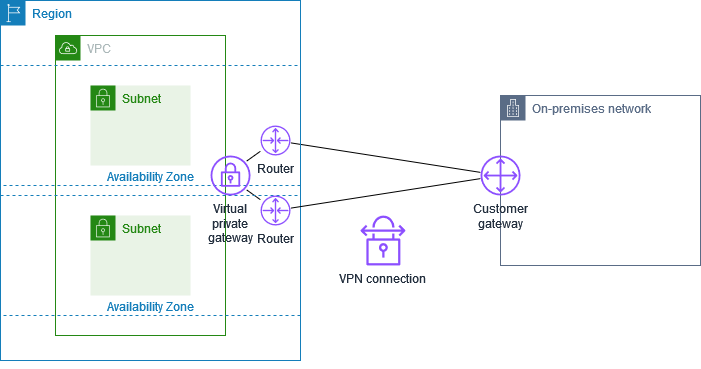
An AWS Site-to-Site VPN connection is IPsec over the internet between your customer gateway device and an AWS endpoint. Each connection includes two tunnels for high availability, and by default each tunnel supports up to 1.25 Gbps. That 1.25 Gbps is an estimated maximum that depends on packet size, cipher choice and your customer gateway, so treat it as a ceiling to test against, not a promise.
Two levers raise the ceiling, and both require you to terminate on a Transit Gateway rather than a virtual private gateway:
- Large Bandwidth Tunnels. You can configure tunnels at up to 5 Gbps per tunnel, but only for VPN connections attached to Transit Gateway or Cloud WAN. They are not supported on virtual private gateway attachments.
- ECMP across multiple connections. With dynamic routing, Transit Gateway uses equal-cost multi-path to aggregate throughput across multiple VPN tunnels. A single flow is still capped at roughly 1.25 Gbps because ECMP in Transit Gateway uses a 5-tuple hash to route each flow through one tunnel, so ECMP helps many parallel transfers, not one big single-threaded copy.
If you terminate on a virtual private gateway instead, throughput is limited to 1.25 Gbps per tunnel and ECMP is not supported, so plan on Transit Gateway if bandwidth is your constraint.
Stand it up
Use BGP if your device supports it, so tunnel failover is driven by liveness checks rather than static routes. A minimal Transit Gateway VPN in Terraform:
resource "aws_customer_gateway" "onprem" {
  bgp_asn    = 65000
  ip_address = "203.0.113.10" # your public endpoint
  type       = "ipsec.1"
}

resource "aws_vpn_connection" "migration" {
  customer_gateway_id = aws_customer_gateway.onprem.id
  transit_gateway_id  = aws_ec2_transit_gateway.core.id
  type                = "ipsec.1"
  # static_routes_only = false  -> dynamic (BGP) is the default here
}
Enable ECMP on the Transit Gateway (vpn_ecmp_support = "enable"), add a second aws_vpn_connection, and advertise the same prefixes over all four tunnels to spread load. One quota to keep in mind: a VPN connection advertises a maximum of 1,000 routes to your customer gateway device, which is generous but real if you are summarising a large on-premises estate badly.
Direct Connect: what you actually get
Direct Connect is a dedicated Ethernet cross-connect from your equipment in a colocation facility to an AWS device. Dedicated connections come in 1, 10, 100 and 400 Gbps ports. If you cannot fill or justify a dedicated port, a partner can provision a hosted connection at 50 Mbps through 25 Gbps, where the partner owns the physical port and carves out your capacity.
The provisioning path is the reason you order early. After you request a connection, AWS makes a Letter of Authorization and Connecting Facility Assignment (LOA-CFA) available, and you then arrange the physical cross-connect with your colocation provider before any traffic flows. That coordination, plus your own network engineering, is measured in weeks, not hours. Once the port is live you create a virtual interface: a private VIF reaches a VPC over private IPs, and a transit VIF reaches Transit Gateways through a Direct Connect gateway. The Direct Connect gateway is a global resource you create in any Region and access from others, which is how one circuit fans out to VPCs in multiple Regions.
One routing quota bites people who lift-and-shift a flat network: over Direct Connect, you can advertise up to 100 routes per BGP session, and the session drops if you exceed it, taking all traffic on that VIF down until you summarise. This is stricter than the VPN limit, so plan your prefixes before cutover.
The encryption gotcha nobody mentions until audit
Direct Connect is a private link, not an encrypted one. AWS Direct Connect is not encrypted by default. Your options depend on port speed:
- MACsec provides Layer 2 encryption but is supported only on 10, 100 and 400 Gbps dedicated connections at selected locations, using 256-bit keys. It is not supported on 1 Gbps dedicated connections or any hosted connection, and you need a MACsec-capable device on your end.
- IPsec VPN over Direct Connect is the fallback for 1 Gbps and sub-1 Gbps links, or any case needing end-to-end encryption across multiple segments. You run a Site-to-Site VPN inside the Direct Connect path, which reintroduces the tunnel throughput caps discussed above.
If your compliance posture requires encryption in transit and you bought a 1 Gbps hosted connection, you have quietly signed up for a VPN on top of it. Check this before you order the port, not during the audit.
The comparison
| Factor | Site-to-Site VPN | Direct Connect |
|---|---|---|
| Time to first packet | Minutes | Weeks (LOA-CFA plus cross-connect) |
| Bandwidth | 1.25 Gbps/tunnel, 5 Gbps large tunnels, ECMP to scale | 1, 10, 100, 400 Gbps dedicated; 50 Mbps to 25 Gbps hosted |
| Path | Public internet | Dedicated cross-connect |
| Encryption | IPsec, built in | None by default; MACsec (10G+) or IPsec over the top |
| Highest availability | Two tunnels per connection, add connections for ECMP | 99.99% SLA with maximum resiliency |
| Cost after migration | Per-connection and data transfer, easy to delete | Port hours plus data transfer, ongoing colo commitment |
What to check before you change anything
Before you pick a link, establish four things. Getting these wrong is what turns a cutover weekend into a rollback.
- How much data, by when. Compute the actual transfer volume and the window. A one-time move of a few terabytes over a weekend does not justify Direct Connect. A sustained multi-gigabit replication feed that continues after cutover does. If the honest answer is a short bulk copy, also compare against an offline option before you assume any network path.
- Your route count and IP plan. Count the prefixes you will advertise. If it approaches the 100-route Direct Connect BGP limit, design summarisation now. Confirm no CIDR overlap between on-premises and your VPCs while you are at it.
- Encryption requirements. Decide whether the data on the wire must be encrypted. If yes, that constrains you to a VPN, a 10 Gbps-plus Direct Connect with MACsec, or IPsec layered over Direct Connect. Do not discover this after the port is provisioned.
- Resiliency target. For anything that must survive a single fibre cut or device failure, use dynamic, active/active connections. Direct Connect's maximum resiliency model reaches a 99.99% SLA using separate connections on separate devices in more than one location; high resiliency uses two single connections to multiple locations for 99.9%. A single Direct Connect circuit is a single point of failure, and its failure mode is worse than a VPN's because you cannot re-provision it in an afternoon.
What each choice costs you later
The VPN's cost is operational drag at scale: internet-path variability, tunnel throughput ceilings that push you into ECMP topologies, and the per-flow cap that no amount of tunnels removes. For a migration that ends, none of that matters, and you delete the connection when you are done.
Direct Connect's cost is commitment. You are paying port hours and coordinating a physical cross-connect that does not unwind cleanly, and you have taken on the resiliency design that a serious hybrid deployment demands. That is money well spent for a genuinely hybrid steady state, and dead weight if the migration was the whole point. The failure mode to avoid is ordering Direct Connect reflexively "because it is the enterprise option," then running a single, unencrypted circuit that becomes both your bottleneck and your outage.
Designing the landing zone network these links plug into, and sequencing the cutover so the switch is boring, is exactly the work we do in our cloud migration practice, alongside the landing zone and connectivity design that decides where these VIFs and Transit Gateways sit in the first place.
Frequently asked questions
Can I use a VPN during migration and switch to Direct Connect later?
Yes, and it is the common pattern. Stand up a Site-to-Site VPN for the transfer window while you order Direct Connect in parallel, since the circuit takes weeks to provision. When the Direct Connect private or transit VIF is live and tested, shift routing to prefer it and keep the VPN as encrypted backup, which is a supported and recommended design.
Is Direct Connect encrypted?
No, not by default. Direct Connect is a private path but the traffic is not encrypted unless you add it. Use MACsec on 10, 100 or 400 Gbps dedicated connections, or run an IPsec VPN over the Direct Connect link for 1 Gbps and smaller connections or when you need end-to-end encryption across multiple network segments.
How much faster is Direct Connect than a VPN?
It depends on what you provision, not on the technology alone. A VPN tunnel tops out around 1.25 Gbps by default, or 5 Gbps with large bandwidth tunnels on Transit Gateway, and you scale further with ECMP across multiple connections. A Direct Connect dedicated port gives you a consistent 1, 10, 100 or 400 Gbps of dedicated capacity, so its real advantage is predictability and per-flow throughput rather than a simple headline number.
Do I need Transit Gateway for a migration VPN?
Only if you need to scale past one tunnel's throughput or connect many VPCs. Large bandwidth tunnels and ECMP both require terminating the VPN on Transit Gateway or Cloud WAN, not on a virtual private gateway. For a single VPC with modest bandwidth needs, a virtual private gateway is a simpler starting point, capped at 1.25 Gbps per tunnel with no ECMP.
What is the biggest mistake when choosing between them?
Buying Direct Connect for a migration that ends, then running it as a single unencrypted circuit. That combines an ongoing cost with a single point of failure and a compliance gap. Match the link to the steady state, size resiliency to the workload, and confirm your encryption and route-count requirements before you order anything physical.