GitHub Actions OIDC to AWS: Keyless Deploys, Scoped Right
Replace the static AWS_ACCESS_KEY_ID and AWS_SECRET_ACCESS_KEY in your GitHub repository secrets with OpenID Connect. You create an IAM OIDC identity provider for token.actions.githubusercontent.com, create an IAM role whose trust policy only accepts tokens from your specific repository and branch, grant the workflow id-token: write, and let aws-actions/configure-aws-credentials exchange a short-lived GitHub token for temporary AWS credentials on every run. No long-lived keys sit in GitHub, and the credentials expire when the job ends.
That is the whole idea. The part that bites people is the trust policy, and a 2026 change to how GitHub builds the subject claim that can lock you out if you pinned it the obvious way. This walks through both.
What to check before you change anything
Do not delete any secrets yet. First build a picture of what you are replacing.
- Find every workflow that authenticates to AWS. Grep your
.github/workflowsdirectories foraws-access-key,AWS_SECRET_ACCESS_KEY, andconfigure-aws-credentials. A repo often has more than one, and a staging job frequently reuses the production key because someone was in a hurry. - Confirm the action version. Note which version of
aws-actions/configure-aws-credentialseach workflow pins. - Check when the repository was created. GitHub changed the default subject claim format for repositories created after a cutoff date in mid-2026 (see the immutable subject section below). A new repo and a five-year-old repo produce different
subvalues, and your trust policy has to match whichever one you actually have. - Decide which identity owns the role. A common and sane pattern is one deployment role per environment in the account that environment lives in, assumed directly from the pipeline. Do not start by granting the role broad permissions; scope the permissions policy the same way you would any application role.
Only once you have temporary credentials working end to end do you remove the static keys. Keep them until the first green OIDC run.
Create the OIDC provider and the role
AWS needs to trust GitHub's token issuer. Register it once per account. AWS's own walkthrough uses exactly this issuer URL and audience.
aws iam create-open-id-connect-provider \
  --url https://token.actions.githubusercontent.com \
  --client-id-list sts.amazonaws.com
Then the role. The trust policy is where the security actually lives. This one accepts a web-identity token only if the audience is sts.amazonaws.com and the subject matches one repository on one branch:
{
  "Version": "2012-10-17",
  "Statement": [
    {
      "Effect": "Allow",
      "Principal": {
        "Federated": "arn:aws:iam::111122223333:oidc-provider/token.actions.githubusercontent.com"
      },
      "Action": "sts:AssumeRoleWithWebIdentity",
      "Condition": {
        "StringEquals": {
          "token.actions.githubusercontent.com:aud": "sts.amazonaws.com"
        },
        "StringLike": {
          "token.actions.githubusercontent.com:sub": "repo:my-org/my-app:ref:refs/heads/main"
        }
      }
    }
  ]
}
aws iam create-role --role-name github-deploy \
--assume-role-policy-document file://trust-policy.jsonAWS will now reject a policy that forgets to scope the subject
Since 2025, IAM treats GitHub's provider as a shared OIDC provider and enforces what it calls identity-provider controls. In practice that means the trust policy must evaluate either the sub claim or the job_workflow_ref claim. If it does not, IAM rejects the role creation or update with a MalformedPolicyDocument error. The reason is blunt: the issuer token.actions.githubusercontent.com is the same for every GitHub customer on earth, so without a subject condition any GitHub repo anywhere could assume your role. This control is evaluated at create and update time, not retroactively, so an older role you never touch can still carry a weaker policy. Fix those while you are in here.
Scope the trust policy so only the right workflow can assume it
The sub claim is a structured string. Its shape depends on what triggered the run, and matching it precisely is what keeps a pull request from a fork, or a different branch, from assuming your production role.
Common subject shapes:
repo:my-org/my-app:ref:refs/heads/mainfor a push tomainrepo:my-org/my-app:pull_requestfor pull-request-triggered runsrepo:my-org/my-app:environment:productionwhen the job targets a GitHub deployment environment
That last one is the strongest lever most teams ignore. If you bind the production role to :environment:production and protect that environment with required reviewers in GitHub, a merge alone cannot deploy to production. The environment's protection rules gate the token before AWS is ever involved.
Two rules worth following:
- Never leave a bare wildcard.
repo:my-org/*or a lone*in the subject means any repo in your org, or any repo at all, can assume the role. IAM specifically refuses a subject condition that is solely a wildcard. - Prefer
StringLikeonly where you genuinely need a wildcard, for example matching any branch for a non-production role. For a single branch or environment,StringEqualsis tighter and less forgiving of mistakes.
If you are building this as part of a wider move onto AWS, the deployment identity is worth designing alongside the landing zone rather than bolting on afterwards. That is the kind of groundwork our cloud migration service handles when teams move pipelines and workloads together.
The immutable subject claim change that can lock you out
Here is the one that surprises people. GitHub changed the default subject format to append immutable numeric IDs to the owner and repository names. The old format was repo:octocat/my-repo:ref:refs/heads/main. The new format looks like repo:octocat@123456/my-repo@456789:ref:refs/heads/main, with an @ delimiter joining the name to its permanent ID.
Why they did it: if you rename or delete a repo or org and someone else later claims that name, the old name-based subject could be minted again by a stranger. That is subject recycling, and it is a real path to someone else assuming a role you still trust.
What it means for you:
- Repositories created after the mid-2026 cutoff use the new format automatically. Repository renames and transfers after that date adopt it too. Existing repos keep the old format unless you opt in.
- This applies to
github.comonly. GitHub Enterprise Server is not affected. - If your trust policy pins
repo:my-org/my-app:ref:refs/heads/mainand the repo later switches to the immutable format, thesubstops matching and deployments start failing with an access-denied onAssumeRoleWithWebIdentity.
The durable fix is to stop trusting names you can rename. Pin the immutable IDs instead. GitHub exposes repository_id and repository_owner_id as separate token claims, and Microsoft's guidance for the same change shows the pattern: match the subject and require the numeric ID. On AWS, add the ID as its own condition:
"Condition": {
  "StringEquals": {
    "token.actions.githubusercontent.com:aud": "sts.amazonaws.com",
    "token.actions.githubusercontent.com:repository_id": "456789"
  },
  "StringLike": {
    "token.actions.githubusercontent.com:sub": "repo:my-org/my-app:*"
  }
}
That survives a rename, because the ID never changes.
The workflow file
The workflow needs id-token: write to request the JWT, and contents: read for the checkout. Grant them at job level, not workflow level.
permissions:
  contents: read

jobs:
  deploy:
    runs-on: ubuntu-latest
    environment: production
    permissions:
      id-token: write
      contents: read
    steps:
      - uses: actions/checkout@v4
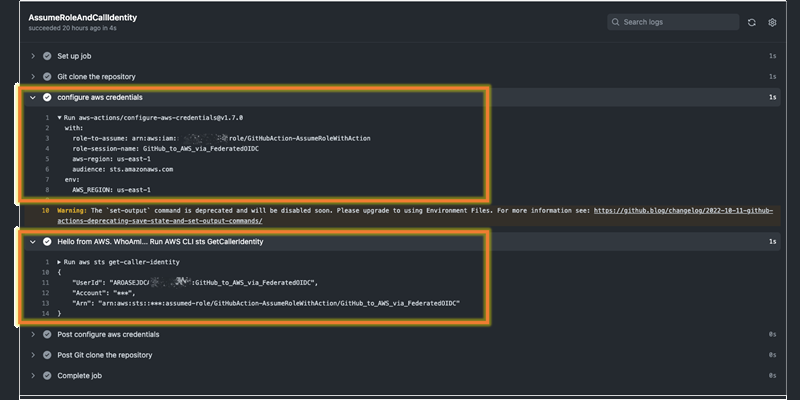
      - uses: aws-actions/configure-aws-credentials@v4
        with:
          role-to-assume: arn:aws:iam::111122223333:role/github-deploy
          aws-region: us-east-1
      - run: aws sts get-caller-identity
Reusable workflows need job_workflow_ref
If your deploy logic lives in a central reusable workflow and many repos call it, pinning sub per repo does not scale. GitHub's job_workflow_ref claim identifies the reusable workflow file itself, and AWS accepts it as the scoping control in place of sub.
The trade-off and what it costs later
OIDC removes stored keys, but it moves the trust into a string-matching policy and ties it to GitHub's claim behaviour. Pick the scoping that matches how your team actually works.
| Scope the role by | Good for | Costs you when |
|---|---|---|
sub with repo + branch | A single repo deploying from one branch | The repo is renamed or adopts the immutable format and the string stops matching |
sub with :environment: | Gating production behind GitHub environment reviewers | You forget to actually protect the environment, so the gate is cosmetic |
repository_id + sub wildcard | Surviving renames and the immutable change | Slightly less readable; you must look up the numeric IDs once |
job_workflow_ref | Many repos sharing one reusable deploy workflow | id-token: write must be set on every caller, or the claim is absent |
The honest summary: static keys are simpler to set up and never silently break on a rename, but they are a long-lived secret that leaks, gets committed, and nobody rotates. OIDC has no secret to leak, but the trust is only as good as the subject condition, and GitHub can change the subject format under you. Pin immutable IDs and the main failure mode disappears. Building this trust model so it stays auditable and least-privilege is core to what our cybersecurity and DevSecOps work covers.
Frequently asked questions
Do I still need AWS access keys in GitHub secrets with OIDC?
No. The whole point is to remove AWS_ACCESS_KEY_ID and AWS_SECRET_ACCESS_KEY from repository secrets. GitHub mints a short-lived JWT per run and the action exchanges it for temporary AWS credentials via sts:AssumeRoleWithWebIdentity. You store only the role ARN, which is not a secret.
Why does my OIDC job fail with "Credentials could not be loaded"?
The most common cause is a missing id-token: write permission. The next most common is a subject mismatch: your trust policy pins a branch or environment the run did not use, or the repo switched to the immutable subject format and your pinned string no longer matches. Check the sub your run actually produced against the token.actions.githubusercontent.com:sub condition.
Will the immutable subject change break my existing pipelines?
It can. Repositories created after the mid-2026 cutoff use the new owner@id/repo@id format automatically, and renames or transfers of any repo after that date adopt it too. If your trust policy matches the old name-based subject exactly, deployments fail once the format changes. Pin repository_id and repository_owner_id instead, since those never change.
Can one IAM role be shared across several repositories?
Yes, but be deliberate. You can widen the sub condition with a wildcard or pin job_workflow_ref for a shared reusable workflow. The risk is that a looser subject condition lets more repositories assume the role than you intended, so pair any wildcard with a repository_owner_id condition to keep it inside your org.
Does this work the same on GitHub Enterprise Server?
The OIDC mechanism works, but the immutable subject claim change applies to github.com only and does not affect GitHub Enterprise Server. If you run GHES, your subject format stays name-based, so scope accordingly and confirm the issuer URL your instance uses rather than assuming the public one.