AWS MGN Cutover: Test, Cutover, and Finalize Without Data Loss
A clean AWS MGN cutover comes down to a sequence, not a single button: let continuous replication reach a healthy state, launch and validate test instances well before the date, mark the servers ready for cutover, launch the cutover instances at your chosen window, then finalize once you have confirmed the new instances work. The cutover window itself is typically measured in minutes—the time between quiescing the source application and traffic landing on the cutover instance—because replication has already copied everything else in the background.
That is the short version. The detail is where migrations go wrong, so here is what each step actually does, what to check before you start, and the trade-off you are signing up for when you rehost with AWS Application Migration Service (MGN).
What actually happens during an MGN cutover
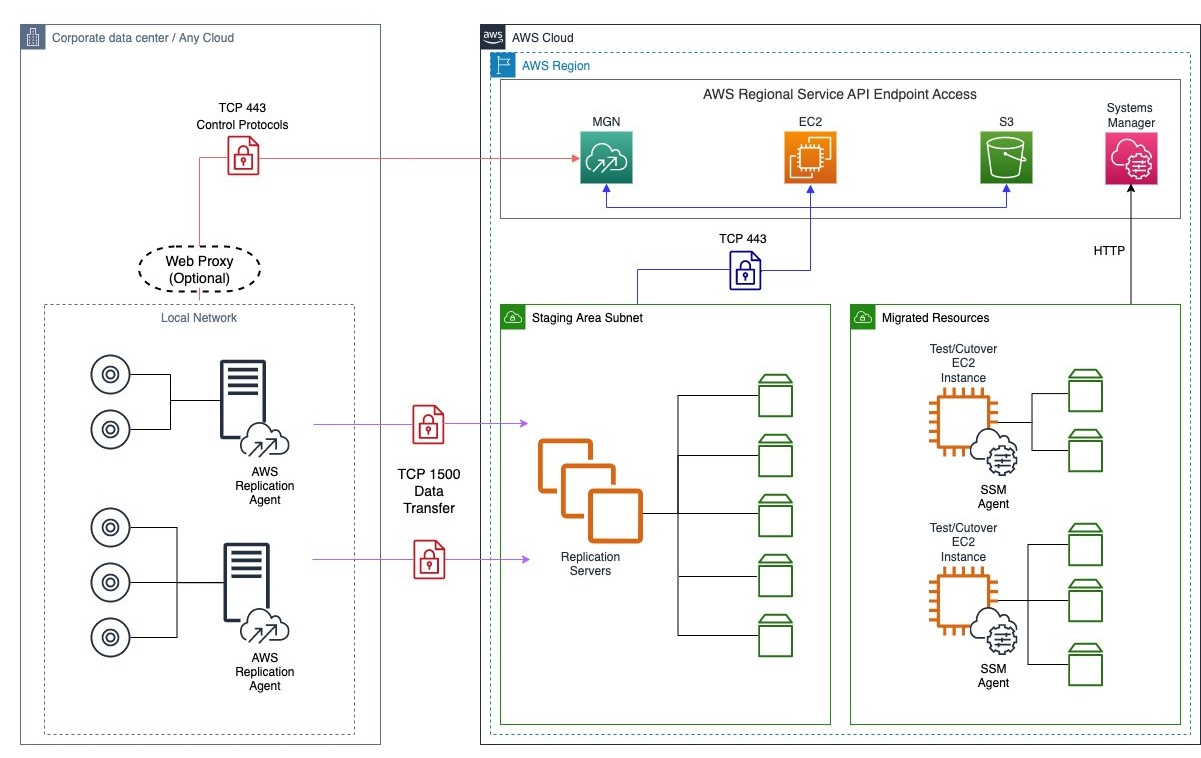
MGN is block-level replication with a lifecycle bolted on top. You install the AWS Replication Agent on each source server, it copies the disks into a staging area in your AWS account, and it keeps them current until you decide to launch.
<cite index="12-11">During continuous block-level replication, the replication agent continuously monitors disk input/output (IO) activity on the protected disks.</cite> That is the mechanism that keeps your downtime small. By the time you cut over, the target disks are already a near-live copy of the source.
The source server moves through a defined set of states. <cite index="13-6,13-7,13-8,13-9">Initial sync is the initial copying of data from external servers. Healthy means all data has been copied and any changes at the source are continuously being replicated. Rescan happens when an event forces the agent to rescan all blocks on the replicated disks, which is like the initial sync but faster because only changed blocks are copied. Stalled means data is not flowing and you may need to intervene.</cite>
You only want to launch test or cutover instances from a server that is Healthy. Watch two numbers while you wait. <cite index="12-9,12-10">Lag is the amount of time since the server was last in Continuous Data Protection mode, and backlog is the amount of data that was written to disk and still needs to be replicated to reach that mode.</cite> If lag or backlog is climbing rather than draining, you have a throughput or connectivity problem, and cutting over in that state means shipping stale disks.
Test instance, then cutover instance
These are two different launches. A test instance proves the machine boots and the application runs in AWS. A cutover instance is the one you keep. Crucially, <cite index="14-2,14-3">for each new cutover MGN first deletes any previously launched test instance and dependent resources, then launches a new cutover instance which reflects the most up-to-date state of the source server.</cite>
Replication does not stop the moment you launch. <cite index="14-4,14-5">After the cutover, data replication continues as before, and the new and modified data on the source server is transferred to the staging area subnet, not to the cutover instances that were launched during the cutover.</cite> This matters: once traffic is on the cutover instance, changes you make there are not protected by MGN. The source and the cutover instance have diverged, and your window to fall back cleanly is closing.
Check these before you change anything
Do not schedule a cutover date until every one of these is true. Fixing them mid-window is how a two-hour maintenance slot becomes a rollback.
Network paths are open and staying open. MGN needs two distinct routes. <cite index="15-1">Each source server added to MGN must continuously communicate with the MGN API endpoint over TCP port 443.</cite> Separately, <cite index="15-2">each source server with an installed replication agent continuously communicates with the replication servers in the staging area subnet over TCP port 1500, which is used for the transfer of replicated data.</cite> If a firewall change or a maintenance reboot drops either, replication stalls silently.
The staging area is sized and reachable. <cite index="16-6">The staging subnet is the most important part of the replication infrastructure, where all MGN replication servers are launched, and it contains the IP addresses the replication traffic is directed to.</cite> For locked-down environments you can keep this entirely private with VPC interface endpoints, but you have to build that before agents can connect.
Replication is genuinely healthy, not just green. Confirm the state is Healthy with lag and backlog at or near zero. Be aware the snapshot layer has its own behaviour: <cite index="12-3,12-4,12-5">MGN retains 5 to 6 snapshots per volume to ensure at least one completed snapshot is available at launch time, because EBS snapshot creation has no SLA and can be delayed or fail independently of the API call.</cite> Launching while snapshots are catching up can produce a slower launch than you planned for.
Encryption expectations are documented. <cite index="15-3,15-4">The replicated data is encrypted and compressed when transferred over TCP port 1500; it is encrypted on the source infrastructure before transfer and decrypted at the staging area before being written to the volumes, using TLS 1.2 end to end.</cite> If your compliance posture also requires encryption at rest on the staging and target volumes, set that in the replication and launch settings, not after cutover.
You have run a real test. <cite index="14-8">It is a best practice to perform a test at least two weeks before you plan to migrate, so you can identify and solve potential problems before the actual migration.</cite> Boot a test instance, connect over SSH or RDP, and exercise the application, not just the login screen.
Running the cutover
Once testing passes, the sequence is mechanical. Do it deliberately.
- Mark the servers ready for cutover. This finalizes the test phase. <cite index="10-2,10-3">You are prompted to terminate the instances used for testing, which is recommended because you are charged for them even though you no longer need them.</cite> After this the lifecycle shows Ready for cutover.
- Confirm the indicators one more time. <cite index="14-6,14-7">The server should show Ready for cutover under the migration lifecycle column and Healthy under the data replication status column before you launch.</cite>
- Launch the cutover instances at your maintenance window. Quiesce the application on the source first (stop writes, flush queues) so the last replicated blocks are consistent. The lifecycle moves to Cutover in progress.
- Validate the cutover instance. Point a canary or your own checks at it. This is your last easy exit.
- Finalize the cutover. This is the point of no return for the old replication state. <cite index="14-9,14-10">Finalizing changes the status to Cutover complete, stops data replication, causes all replicated data to be discarded, and terminates all AWS resources used for data replication.</cite>
If you prefer to script the last step, the CLI is explicit about what it tears down:
aws mgn finalize-cutover \
  --source-server-id s-1234567890abcdef0 \
  --region eu-west-1
<cite index="11-2,11-3,11-4,11-5">All AWS resources created by MGN for replicating these source servers are terminated or deleted within 90 minutes, launched test or cutover instances are not terminated, the replication agent receives a command to uninstall itself within 10 minutes, and the source server lifecycle state changes to CUTOVER with replication set to DISCONNECTED.</cite>
After finalizing, <cite index="14-11,14-12">MGN automatically stops data replication for the cutover source servers to save resource costs, and the next step becomes Mark as archived.</cite> Archiving is housekeeping: <cite index="14-13">it removes these source servers from the main source servers page so you can focus on servers that have not yet been cut over.</cite>
If something looks wrong
You are not committed until you finalize. <cite index="10-6">You can revert a finalized cutover if you encounter any issues or want to reverse the cutover for any reason.</cite> That is exactly why you validate the cutover instance before finalizing. Cleaning up the agent later is a separate action: <cite index="10-5">finalizing does not uninstall the agent, so use Disconnect from service under the Actions menu when you want to uninstall it from the source.</cite>
Here is how the post-launch actions differ, because the names are easy to confuse:
| Action | What it does | Reversible? |
|---|---|---|
| Mark as ready for cutover | Ends the test phase, optionally kills test instances | Yes, revert to ready for testing |
| Launch cutover instance | Boots the keeper instance from latest replicated state | Yes, replication still runs |
| Finalize cutover | Stops replication, discards staged data, tears down replication resources | Revert possible but state is gone |
| Mark as archived | Hides the source server from the main list | Yes, via filters |
| Disconnect from service | Uninstalls the agent from the source | No |
The trade-off you are actually making
MGN is a rehost tool. It lifts your server, disks and all, into EC2 without changing the application. That is its strength and its bill later. You get a fast, low-risk cutover with a small downtime window, and in exchange you carry your existing architecture into the cloud unchanged: the same instance sizing, the same single points of failure, the same patch debt, now running on hourly EC2 pricing instead of sunk-cost hardware.
The cost shows up in the months after. A server that was "fine" on a depreciated box can be badly oversized or undersized on EC2, and you will not know until you have real utilization data. Nothing about a rehost gives you autoscaling, managed databases, or better recovery objectives. Those are follow-on projects, and they are the right follow-on projects, but plan for them rather than assuming the migration delivered them.
The honest sequencing is: rehost to exit the datacentre on a deadline, then modernize the workloads that justify it. Getting the cutover boring is the job of a well-planned cloud migration, and the right-sizing, SLOs, and on-call that make the rehosted estate sustainable are the job of reliability and SRE. Treating them as one step is how migrations slip.
Frequently asked questions
How much downtime does an AWS MGN cutover cause?
Only the window between quiescing the application on the source and validating traffic on the cutover instance, with the cutover window itself typically measured in minutes, because the disks are already replicated. <cite index="14-2,14-3">MGN launches a fresh cutover instance reflecting the most up-to-date state of the source server.</cite> Your real downtime driver is how long your application takes to stop cleanly and start on the new instance, not the copy itself.
Can I roll back after an MGN cutover?
Before you finalize, yes. <cite index="14-4,14-5">Replication continues after the cutover launch, sending new source data to the staging area subnet rather than to the cutover instance,</cite> so the source and its staged copy remain intact. <cite index="10-6">You can revert a finalized cutover if you hit issues,</cite> but finalizing discards the staged data, so validate the cutover instance before you take that step.
What is the difference between finalizing and archiving in MGN?
Finalizing ends the migration for a server: <cite index="14-9,14-10">it stops replication, discards replicated data, and terminates the replication resources.</cite> Archiving is purely cosmetic. <cite index="14-13">It removes the source server from the main list so you can focus on servers not yet cut over,</cite> and you can still reach archived servers through filters.
What should I check before launching a cutover instance?
Confirm the lifecycle shows Ready for cutover, replication shows Healthy, and lag and backlog are at zero. Verify the network paths are open, since <cite index="15-1,15-2">source servers need TCP 443 to the MGN API endpoint and TCP 1500 to the replication servers in the staging subnet.</cite> Then make sure you have already run and validated a test instance rather than trusting the console status alone.
Does MGN modernize my workloads during migration?
No. It rehosts them as-is, which is why the cutover is fast and low-risk. Right-sizing, managed services, and improved availability are separate efforts you undertake after the servers are running in AWS, and you should budget for them explicitly rather than expecting the rehost to deliver them.