AWS Application Migration Service: Planning a Clean MGN Cutover
The AWS Application Migration Service (MGN) rehosts physical, virtual and cloud servers by continuously replicating their disks, block level, into a staging subnet in your target account. When you cut over, the data is already there, so MGN just converts the latest snapshot and boots an EC2 instance from it. That is why AWS describes cutover windows in minutes: the slow part, copying terabytes, happened days earlier while the source kept running.
This article is about running that cutover cleanly. Not whether to migrate, and not the business case: the mechanics. What to check before you install an agent, the settings that decide whether your launched instances actually work, and the cost you defer by lifting and shifting instead of rebuilding.
What MGN actually does, and what it does not
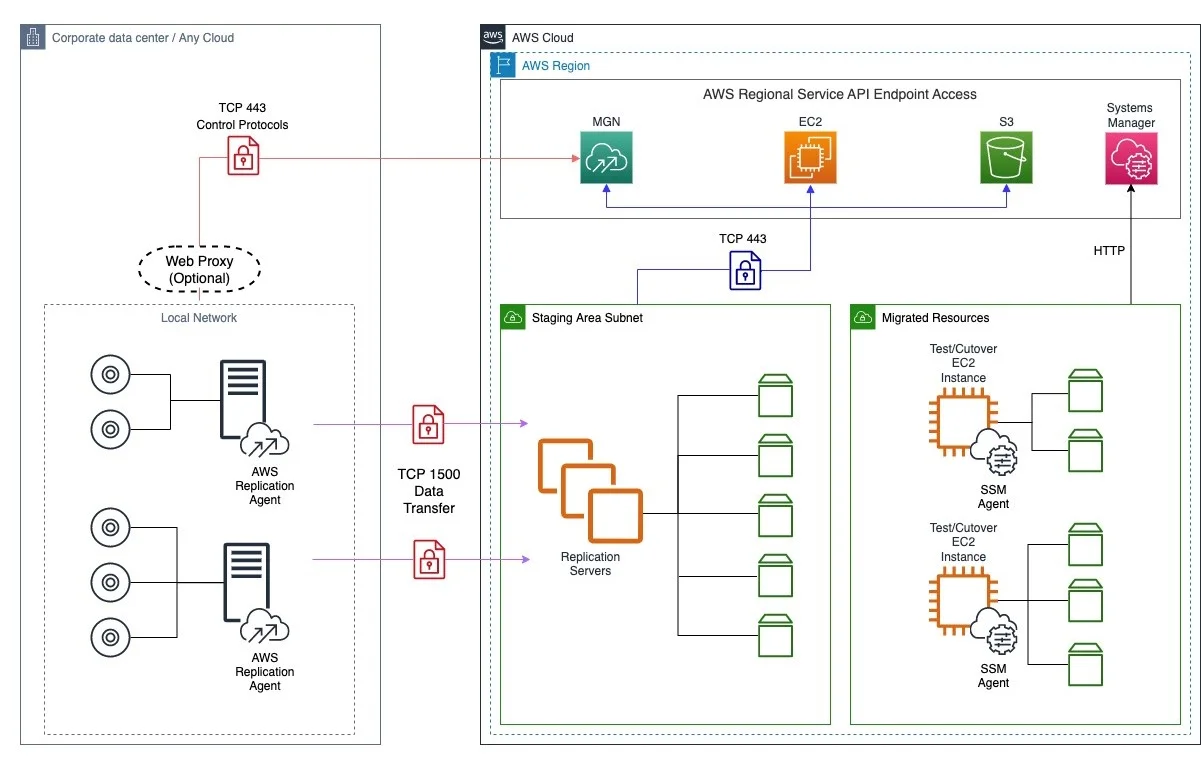
MGN installs a replication agent on each source server. The agent reads the disks and streams changes into a staging area subnet, where lightweight replication servers write them to EBS volumes. This is continuous block-level replication, so it is agnostic to what runs on top: databases, application servers, a legacy Windows box nobody wants to touch. It does not care about your application stack.
What MGN does not do is understand your application. It copies blocks. If your source server depends on a hardcoded IP, a DNS name that will not resolve in the VPC, an on-premises license server, or a NIC-bound license, the launched instance inherits that problem exactly. MGN is a faithful copier, not a fixer. Treat it as rehost first, improve second, which is the model AWS itself recommends for replatforming after the move.
If you want the disciplined version of this, our cloud migration service plans the cutover so the boring outcome is the expected one.
Check this before you install a single agent
In our experience, MGN migrations most often fail at the network layer, and they fail quietly: agents install, then never report replication progress. Sort this out first.
The two network paths and their ports
There are two distinct conversations happening, and both must be open.
| Path | Port | Carries |
|---|---|---|
| Source server to MGN API endpoint | TCP 443 | Agent download, control, status, server metadata |
| Source agent to replication servers (staging subnet) | TCP 1500 | Replicated disk data |
| Replication servers to MGN | TCP 443 | Replication software, status, metrics |
Every source server must reach the MGN API endpoint over TCP 443 for control and status, and every agent must reach the replication servers in the staging subnet over TCP 1500 for the actual data transfer. The replicated data is encrypted in transit, so port 1500 traffic is not plaintext on your network.
If replication never starts, check the corporate firewall for outbound 443 from the source first. On Linux you can confirm the source can send by adding the rule explicitly:
sudo iptables -A OUTPUT -p tcp --dport 443 -j ACCEPT
sudo iptables -L OUTPUT -n
On Windows, check the outbound rule for remote port 443 is enabled. These are the first checks to run when connectivity is blocked. If you run isolated networks with no internet egress, plan the private-connectivity variant before you start, not after agents are already failing.
Staging subnet and IAM
The staging area subnet is not the subnet your production instances will run in. It is a working area that holds replication servers and in-flight EBS volumes. Size it and route it deliberately.
Separately, decide now how launched instances will reach AWS Systems Manager. Post-launch validation depends on the SSM agent, and the SSM agent needs to reach SSM endpoints. That means your cutover subnet needs either a NAT gateway or the relevant VPC endpoints so instances can contact SSM. Sort the IAM instance profile out at the same time: the launched instance needs AmazonSSMManagedInstanceCore for SSM core functionality.
The three templates that control everything
MGN behaviour is governed by three templates, applied automatically to every server you add, and overridable per server.
- Replication template: staging subnet, replication server instance type, EBS encryption, bandwidth throttling. This controls the copy.
- Launch template: the EC2 shape of the launched instance. Here you can set instance type, subnet, security groups, BYOL licensing and MAP tagging, all defined in the launch template.
- Post-launch template: automation that runs after the instance boots.
One sharp edge worth knowing: do not delete the account-level launch template. If you do, MGN generates a new default and discards your previous changes, including subnet and security groups. People hit this when scripting cleanup and then wonder why new servers land in the wrong subnet.
Running the cutover
The lifecycle is: replicate, test, cut over, finalize, archive. The discipline is in doing test and finalize properly, not in the cutover click itself.
Test launches, done early
Launch test instances well ahead of the real date. AWS recommends performing a test at least two weeks before you migrate, and the reason is practical: a test surfaces the DNS, license and connectivity problems MGN will not fix for you, while you still have time to fix them. After a test launch, connect over SSH or RDP and confirm the application, not just that the box booted.
Cutover and finalize
On the day, you launch cutover instances for the selected source servers. You can cut over one server at a time or many simultaneously, and each reports success or failure independently. For every new cutover, MGN first deletes any previously launched test instance and its dependent resources, so do not leave anything you care about on a test instance.
Now validate the running cutover instance, again over SSH or RDP, and run your acceptance checks. Turn on EC2 termination protection after testing and before you finalize. If something is wrong, you can revert: reverting returns the source server to Ready for cutover and optionally deletes the cutover instances to save cost. This revert path is your safety net, so know it exists before you need it.
Finalizing is the point of no return for replication. When you finalize, MGN stops replication and discards all replicated data, terminating every AWS resource used for replication. The source lifecycle moves to Cutover complete. From the CLI:
aws mgn finalize-cutover --source-server-id s-1234567890abcdef0Do not finalize until you are genuinely done, because after this the replicated data that made a fast re-cutover possible is gone. Archive the source servers afterwards to keep the console focused on what is still in flight.
Post-launch actions: validation, not magic
MGN can run SSM-based actions on each launched instance. When you enable post-launch actions, MGN installs the SSM agent, which is required for every other action. From there you get a menu of predefined actions: volume integrity validation, process status validation, EC2 connectivity checks, CloudWatch agent installation and more. Volume integrity validation checks the volumes on the launched instance, and process status validation confirms named processes are running after boot, which is a cheap way to catch a service that failed to start on the migrated instance.
Use these to encode your acceptance test as automation rather than a runbook someone reads at 2am. Installing the CloudWatch agent as a post-launch action also means your migrated fleet arrives with observability already attached, which is where the migration hands off to whoever runs the system afterwards. Getting on-call and SLOs right on the far side of a cutover is its own discipline, and it is what our reliability and SRE service exists to set up.
The trade-off: rehost now, pay for it later
Lift and shift with MGN is the right call when the goal is exiting a datacentre on a deadline, and it is honestly worse than rebuilding when the goal is a clean cloud-native footprint. Both are true. Here is the trade you are making.
| Rehost with MGN | Rebuild in place | |
|---|---|---|
| Time to cut over | Days to weeks | Weeks to months |
| Cutover risk | Low, replication is complete before cutover | Higher, new build plus data move |
| Cloud fit on day one | Poor: same instance shapes, same OS, same config | Good: right-sized, managed services |
| Cost paid later | Modernisation debt, oversized instances | Paid up front |
What rehosting costs later is concrete, not abstract. You will run instances sized like your old hardware rather than your actual load. You will carry OS versions and agents you would not choose fresh. Databases arrive on EC2 rather than on a managed service. None of that is a reason to avoid MGN. It is a reason to book the follow-up work: MGN's post-launch actions can convert operating systems, replace subscriptions and change licensing during the move, and the rest belongs in a modernisation backlog with owners and dates. The failure mode is not rehosting. It is rehosting and then pretending the debt is not there.
Frequently asked questions
How long does the MGN cutover window take?
The cutover itself is typically minutes, because MGN has already replicated your disks block level into the staging subnet before you cut over. The window is the time to stop the source, launch the EC2 instance from the latest data, and validate. Initial replication of a large server can take days, but that runs in the background while the source stays live, so it is not part of the downtime.
What ports does the AWS Replication Agent need open?
Two. Each source server needs outbound TCP 443 to the MGN API endpoint for control and status, and each agent needs TCP 1500 to the replication servers in the staging subnet for the replicated data. If replication never starts, a corporate firewall blocking outbound 443 from the source is a common cause.
Can I undo a cutover in AWS Application Migration Service?
Yes, up to a point. Before you finalize, you can revert a cutover, which returns the source server to Ready for cutover and optionally deletes the cutover instances. Once you finalize, MGN discards the replicated data and terminates the replication resources, so a fast re-cutover is no longer available. Finalize only when validation is complete.
Does MGN modernise my servers or just copy them?
By default it copies. MGN does faithful block-level replication and launches an instance that matches the source, so application-level problems come across unchanged. It does offer predefined post-launch actions such as OS conversion, license changes and validation checks, but treat modernisation as deliberate follow-up work rather than something the migration does for you.
What should I test before the real cutover?
Run a test launch at least two weeks ahead, which is the interval AWS recommends, and connect over SSH or RDP to check the application actually works, not just that the instance booted. Verify DNS resolution inside the VPC, any external license dependencies, and connectivity to databases and other tiers. Encode those checks as post-launch actions so the real cutover validates itself.