AWS SCP Guardrails: What They Enforce and Where They Fail
An AWS service control policy (SCP) sets the maximum permissions that IAM users and roles in your member accounts can ever have. It never grants access, it only takes it away, and the effective permission is the intersection of the SCP and the account's own IAM policies. That makes SCPs the right tool for preventive guardrails like "no one may leave approved regions" or "no one may disable CloudTrail." But four common assumptions about them are wrong, and if you build a landing zone on those assumptions you will ship gaps you cannot see.
This is the part of AWS Organizations worth getting right before you move production workloads into new accounts, because a guardrail attached after the workload is already running is a guardrail you have to test against live traffic.
What an SCP actually does
An SCP is a filter, not a grant. <cite index="0-8">SCPs are access controls that specify the maximum available permissions for the IAM users and IAM roles in your organization, and an SCP never grants permissions.</cite> A principal still needs an identity-based or resource-based policy that allows the action. The SCP just decides whether that allow is permitted to take effect.
The mental model that matters: <cite index="0-0">the effective permissions are the logical intersection between what is allowed by the SCP and resource control policies (RCPs) and what is allowed by the identity-based and resource-based policies.</cite> If either side says no, the answer is no. A user with AdministratorAccess in an account under a deny-EC2 SCP cannot launch an instance. A user with no IAM policy at all still has no access even if every SCP allows everything.
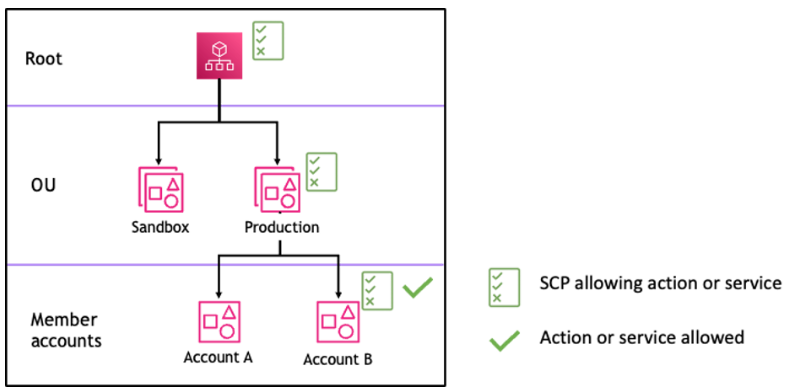
Evaluation runs top to bottom through the org tree. <cite index="1-0">For a permission to be allowed for a specific account, there must be an explicit Allow statement at every level from the root through each OU in the direct path to the account, including the target account itself.</cite> This is why Organizations attaches a managed policy called FullAWSAccess when you enable SCPs, and why removing it by accident is a way to lock an entire OU out of AWS.
The four things SCPs do not restrict
This is the section that saves incidents. SCPs have real blind spots, and each one has a workaround.
The management account is exempt
<cite index="0-1,0-2">SCPs don't affect users or roles in the management account. They affect only the member accounts in your organization.</cite> Anything running in the management account, and any admin operating there, is outside the guardrail. The fix is operational, not technical: keep the management account empty of workloads and human day-to-day access, and run everything in member accounts under OUs.
Service-linked roles ignore SCPs
<cite index="3-1,3-2">SCPs do not affect any service-linked role. Service-linked roles enable other AWS services to integrate with AWS Organizations and can't be restricted by SCPs.</cite> If you write a region-deny SCP and expect it to stop a service-linked role from acting in a blocked region, it will not. Plan your denies around actions that human and application roles take, not around what AWS services do on your behalf.
External principals reaching your resources
An SCP constrains principals in your accounts. It does nothing about someone else's account touching your bucket. <cite index="0-10,0-11">SCPs don't affect resource-based policies directly, and they don't affect users or roles from accounts outside the organization.</cite> The documented example is precise: <cite index="0-12,0-13,0-14">if an S3 bucket in account A grants access to users in account B outside the organization through its bucket policy, and account A has an SCP attached, that SCP does not apply to those outside users in account B.</cite>
This is exactly the gap resource control policies close. <cite index="2-0,2-1">Use an SCP when you need to limit permissions of IAM principals within your organization's member accounts. Use an RCP when you need to restrict IAM principals that are external to your organization accounts making requests to access resources within your member accounts.</cite> An RCP is the way you enforce "no principal outside this organization may read data in these accounts," and it applies broadly: <cite index="2-6">RCPs impact the effective permissions of principals trying to access resources in a member account, regardless of whether the principals belong to the same organization or not, and this includes root users.</cite> RCPs have their own blind spot that mirrors the SCP one: <cite index="2-7">the exception is service-linked roles, because RCPs do not apply to calls made by service-linked roles.</cite>
The member account root user is mostly, but not fully, covered
An SCP does apply to the root user of a member account, unlike the management account. <cite index="3-0">SCPs affect all users and roles in attached accounts, including the root user, with the only exceptions being tasks and entities not restricted by SCPs.</cite> Treat "including root" as the useful part and read the exceptions list before you rely on an SCP to fence in root actions like account recovery.
Deny list or allow list: pick deliberately
There are two ways to write guardrails and they age very differently.
A deny list keeps FullAWSAccess in place and layers Deny statements on top. New AWS services work the day they launch. You block specific dangerous actions. This is the pragmatic default for most organizations because a Deny is absolute: <cite index="1-2">a deny policy attached to any level in the organization is evaluated for all the OUs and member accounts underneath it.</cite>
An allow list replaces FullAWSAccess with a policy that names only permitted services, so anything not listed is blocked by default. It is stricter, and it is also a maintenance commitment. <cite index="1-6">Missing an Allow statement at the root level in an SCP is a critical misconfiguration that will effectively block all access to AWS services and actions for all member accounts in your organization.</cite> Every new service you adopt needs a policy edit before anyone can use it.
| Deny list | Allow list | |
|---|---|---|
| Base policy | Keep FullAWSAccess | Replace FullAWSAccess |
| New services | Work immediately | Blocked until added |
| Failure mode | A missed action stays allowed | A missed allow blocks everyone |
| Best for | Most orgs, most OUs | High-assurance or regulated OUs |
You can mix them: deny lists across the org, an allow list on a sensitive workload OU. Just know which one you are running per OU, because the cost of getting an allow list wrong shows up as a full outage for that branch of the tree, and the cost of a deny list is a permission you thought you had removed and did not.
Guardrails worth attaching first
Start with a small number of high-value denies on a test OU, not on the root. These are the ones that pay off before a migration, when accounts are still empty.
Region deny
Confine activity to approved regions. Control Tower ships this as the landing zone Region deny control, and the pattern is instructive: it uses Deny with NotAction so that global services still function. <cite index="4-2,4-3">Certain global AWS services, such as IAM and AWS Organizations, are exempt from data residency controls, and those services are specified in the SCP example code.</cite> Two constraints to plan around: <cite index="4-0,4-1">You cannot exclude your home Region. Actions not listed in the SCP are not permitted.</cite>
{
  "Version": "2012-10-17",
  "Statement": [{
    "Sid": "DenyOutsideApprovedRegions",
    "Effect": "Deny",
    "NotAction": [
      "iam:*", "organizations:*", "sts:*", "cloudfront:*",
      "route53:*", "support:*", "kms:*"
    ],
    "Resource": "*",
    "Condition": {
      "StringNotEquals": {
        "aws:RequestedRegion": ["eu-west-1", "eu-west-2"]
      }
    }
  }]
}
Keep the NotAction list honest: it is the set of global or exempt actions you accept running anywhere, and every entry is a small hole you are choosing to leave open.
Protect the audit and detection plane
Deny the actions that would blind you: stopping CloudTrail, deleting a trail, disabling GuardDuty, or turning off Config recorders. If an attacker or a careless engineer can switch off logging, every other control degrades quietly.
{
  "Version": "2012-10-17",
  "Statement": [{
    "Sid": "ProtectSecurityServices",
    "Effect": "Deny",
    "Action": [
      "cloudtrail:StopLogging",
      "cloudtrail:DeleteTrail",
      "guardduty:DeleteDetector",
      "guardduty:DisassociateFromMasterAccount",
      "config:StopConfigurationRecorder",
      "config:DeleteConfigurationRecorder"
    ],
    "Resource": "*"
  }]
}
Lock down the perimeter with an RCP
Where SCPs cannot reach external access, an RCP can require that any principal touching your resources belongs to your organization, using a condition on aws:PrincipalOrgID. Attach it the same careful way you attach SCPs. Getting identity and network boundaries right at this layer is the substance of a workable cloud architecture and landing zone design, not an afterthought once workloads are live.
Roll it out without locking yourself out
The failure mode here is dramatic and self-inflicted, so the process matters more than the policies.
Never attach a new SCP to the org root first. Attach it to a single test account or a low OU, confirm nothing legitimate breaks, then work upward. The signal to watch is denials: review CloudTrail for AccessDenied events after each attachment, the same method AWS documents for validating RCP impact by <cite index="2-5">reviewing AWS CloudTrail logs for Access Denied errors.</cite>
Two operational limits shape how you organise policies. AWS raised the quotas so that <cite index="5-0">the maximum number of SCPs attached to a single node increased from 5 to 10, and the maximum SCP size increased from 5,120 to 10,240 characters.</cite> You will still hit those ceilings faster than expected, so consolidate related denies into one policy per theme rather than one policy per rule.
Keep the whole thing in version control and apply it through a pipeline, not the console. Guardrails that drift because someone edited a policy by hand at 2am are worse than no guardrails, because they read as protection on the org chart while enforcing something else. Building that paved road for policy changes is core platform and DevOps work, and it is what keeps the guardrails you tested equal to the guardrails that are running.
If you are standing up these controls specifically so that a wave of workloads lands into governed accounts rather than a flat, permissive one, sequence them before the move. That ordering, guardrails first and workloads second, is a deliberate part of planning a cloud migration where the cutover is boring.
Frequently asked questions
Do SCPs apply to the AWS account root user?
For member accounts, yes. <cite index="3-0">SCPs affect all users and roles in attached accounts, including the root user, with the only exceptions being the tasks and entities not restricted by SCPs.</cite> The important exception is the management account, whose users and roles are never affected by SCPs, which is why you keep workloads and human access out of it.
What is the difference between an SCP and an RCP?
They cover different directions of access. <cite index="2-0,2-1">Use an SCP to limit the permissions of IAM principals within your member accounts, and use an RCP to restrict IAM principals that are external to your organization when they make requests to access resources in your member accounts.</cite> SCPs filter what your people and roles can do; RCPs filter who can reach your resources, including principals outside the organization.
Will an SCP stop cross-account access to my S3 bucket?
No, not by itself. <cite index="0-12,0-13,0-14">If a bucket grants access to users in an account outside the organization through its bucket policy, an SCP on the bucket's account does not apply to those outside users.</cite> Use a resource control policy with an aws:PrincipalOrgID condition to enforce that only principals in your organization may access the resource.
Why did enabling an allow-list SCP break everything?
Because an allow list depends on an explicit allow at every level of the tree. <cite index="1-0">There must be an explicit Allow statement at every level from the root through each OU in the direct path to the account.</cite> If you remove FullAWSAccess without a complete replacement, the implicit deny takes over and blocks all actions for every account beneath that node.
Can an SCP restrict what AWS services do on my behalf?
No. <cite index="3-1,3-2">SCPs do not affect any service-linked role, because those roles let AWS services integrate with your account and cannot be restricted by SCPs.</cite> Write your denies around the actions taken by human and application roles, and do not rely on an SCP to constrain service-linked role behaviour.